



zplCloud Blog
Online viewer, desktop tool, or local script? The better question: where does your label pipeline run?
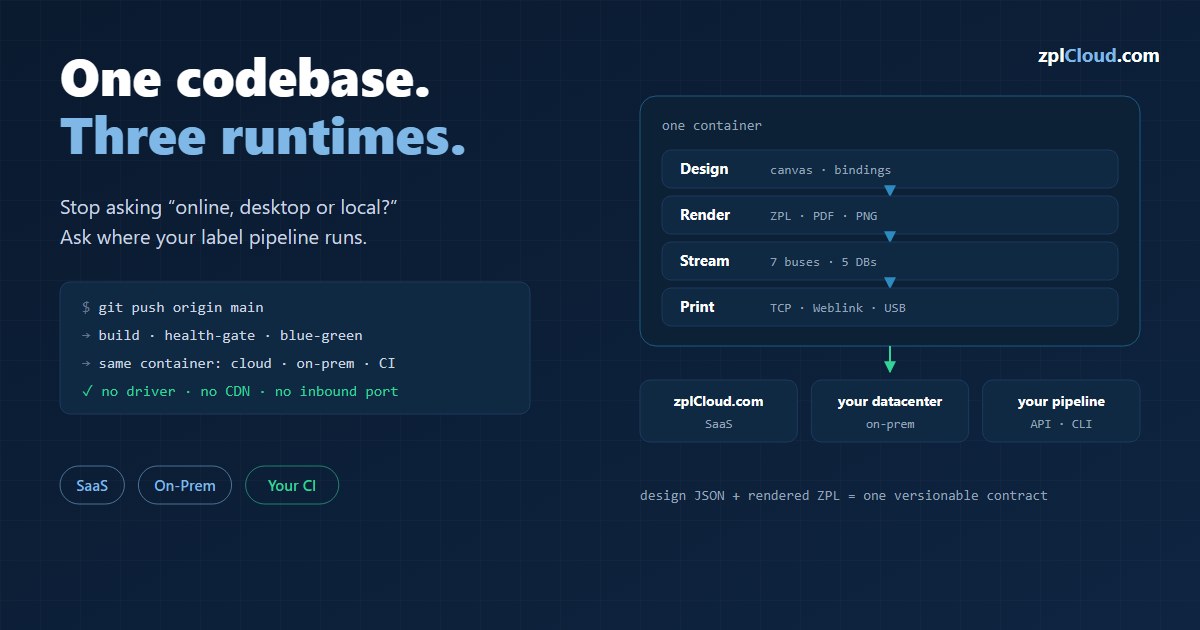
The "online vs desktop vs local" debate ends when design, rendering, streaming and print live in one container - cloud, on-prem or in your own datacenter, deployed by a git push.
Online, desktop or local - the wrong question
Anyone working with Zebra labels knows the moment: the label looks right in the code, then prints shifted, rotated, cut off - or with a barcode that will not scan. The usual answer is a question about the type of tool: an online viewer for speed and collaboration, a desktop tool for offline and restrictive networks, a local dev script for developers who stay close to the code. Add a few criteria - security, collaboration, debugging speed, IT constraints, volume - and the decision is made.
That is a workable frame. For a viewer.
zplCloud answers the same question differently. We do not compare "which window shows me the label", we ask "where does the whole path from data event to physical label run?". And there the either-or turns into an and: zplCloud is a cloud viewer, a desktop tool and a local tool at once - because design, rendering, streaming and print sit in one container that you start wherever your data and printers are. The question is no longer "which kind of tool?", it is "which environment do I deploy the pipeline into?"
The shift in one table
| The usual split | The zplCloud answer |
|---|---|
| Online / cloud viewer | zplCloud.com as SaaS - no install, open a browser, render a label, share it |
| Desktop viewer (offline, restrictive) | the same container on-prem - your datacenter, your firewall, full control |
| Local dev tools (close to the code) | API + CLI - render in your own CI, through a git pipeline, curl or zplcloud send |
Not three products. One codebase, three runtimes. Which is exactly why the classic decision logic can be turned on its head: instead of "which tool type fits my constraint?" it becomes "which constraint do I have - and on which host does the container run for it?".
Render first, print second - with the real engine
The most common mistake in label projects is treating "it renders" as "it prints correctly". zplCloud closes that gap by using the same engine for preview and print.
- The designer renders the PNG/PDF/SVG/ZPL preview in its own backend - no external render service, no runtime call to an external CDN (for us a hard rule, for compliance and availability alike).
- What you see in the preview is byte for byte what later goes to the printer as ZPL (
^XA…^XZ). A 203 dpi render is a 203 dpi render - barcode, QR, TrueType font, all from one source. - The engine is built as a batch-capable API:
POST /api/zpl,/api/render/png,/api/render/pdf. One design plus N records equals N labels - no clicking per label. - Performance is a design principle, not a feature: rendering runs inside the container process, scales horizontally (more replicas, more render throughput) and can be measured against any stage with the bundled perftest image (
scripts/perftest.sh, modeszpl/pdf/png/zpl-api) - a load test before go-live instead of hope afterwards.
That is the answer to "volume and regression": anyone producing many label variants programmatically (templates, dynamic fields, many SKUs) does not need a viewer window, they need a repeatable render path - and here that is an API call, not a screenshot.
Events instead of a button: data and event streaming
A viewer is first and foremost a quality gate before the print. In real logistics, though, printing is usually the consequence of an event: an order event, a picking task, a serial number from the MES, a row from the ERP.
zplCloud turns the event straight into the print trigger. Seven message buses feed it:
- Apache Kafka - subscribe to a topic; every message is rendered with a label design and sent to a printer. Cloud mode (broker on the internet, Confluent or MSK for example) or on-prem mode (broker behind your firewall, consumed by the CLI agent - the broker credentials never leave your network).
- Azure Service Bus, MQTT, AMQP 1.0, RabbitMQ, Amazon SQS and Google Pub/Sub - the same mechanics for every other environment. MQTT is the one that matters on a factory floor, where scales, scanners and PLCs already hang off the broker.
- Data hub sources - SQL Server, MongoDB, PostgreSQL, MySQL and MariaDB. Lookup by pushdown through the CLI agent: the query runs on-prem, only the result travels to the platform. Reachable cloud databases can also be connected directly, with no agent at all.
And here is the part where most streaming integrations get vague, so let us be precise:
- The consumer acknowledges only after a successful print. Print failed? Kafka leaves the offset where it was, Service Bus abandons the message and dead-letters it after three deliveries, MQTT simply does not ack and the broker redelivers at QoS 1 or 2. No silent skipping, no infinite retry loop.
- Broker errors (unreachable, auth rejected, topic gone) are not print errors, so they get exponential backoff (5 s to 60 s) with the state visible in the UI.
- A keepalive wakes Link-OS printers out of standby, so the first label after a pause is not slowed down by wake-up latency.
A label that was not printed is a physical fact somebody has to see. That semantic is what enforces it - and that is the difference between a viewer and a pipeline.
Both directions, including the bucket
Print files often already live in object storage: carrier labels, pre-rendered batches, archives kept for retention rules. So the bus message does not have to carry the ZPL at all - it can point at it:
{ "schemaVersion": 1, "printer": "*", "zplRef": { "storage": "archive", "key": "orders/4711.zpl" } }
The file is fetched from S3 or Azure Blob at print time. And the other way round: an output target writes every printed label back into a bucket, sends a message to any of the seven buses and fires an HMAC-signed webhook - each step switched on separately, all of them after the print, so a slow bucket never holds up the line.
A custom interface for the shop floor: print views
The other side of the same coin: not every label comes from an event. Often a person stands at the packing bench, in shipping, in the warehouse - and needs something usable, not a terminal.
A print view is exactly that. From a saved design the platform generates a responsive form of its own, with its own link:
https://print.zplcloud.com/d/{designKey}/{viewSlug}
What that means for the workflow, and why it works on the go:
- Mobile-first and PWA: every view ships its own
manifest.jsonand app icon. "Add to home screen" turns the link into an app icon on Android and iOS that opens straight into the form. An app without an app store, without installation, without drivers. - A form, not a designer: text fields with validation, dropdowns from a data source, checkboxes. The operator fills in values, not ZPL. Only the fields you marked visible can be edited.
- A scanner button next to every field: tap the camera, scan a barcode or QR straight into the field. That is what decides whether a print view survives contact with reality - typing a 13-digit EAN on a phone at the packing bench does not.
- Live preview: a PDF preview re-renders as you type, with the same server-side engine that produces the ZPL. What is on the screen is what comes out of the printer.
- A projection, not a share link: values are validated server-side, locked fields are not even in the payload, and the design itself never reaches the browser. Whoever has the URL may print this one label - they cannot reach your account.
Printing goes to a Weblink printer, a remote printer on the CLI agent, or to a PDF in the local print dialog. And when the view hangs off a data hub source, a parameterised query pulls the row out of your ERP and prefills the form - the DHL variant even buys real postage against an order ID and prints the stamp.
That covers the full range: events trigger printing automatically, print views give people on the move a safe, minimal interface - and both run on the same render engine in the same container.
The real point: deploy through a git pipeline
Now to the part that answers the "online vs desktop vs local" question on a completely different level: deployment.
You install a viewer. You deploy a print platform - with the same tool your developers already ship code with: git.
The sequence is deliberately built so it succeeds every time:
1. Push to a branch equals deploy to a stage. dev goes to the test stage (zplcloud_test), main to production (zplcloud). The Azure pipelines (backend/azure-pipelines-backend.yml, weblink/azure-pipelines-weblink.yml) trigger on branch push.
2. Docker build from the repo - one image (Angular frontend plus ASP.NET Core API, based on aspnet:10 azurelinux3, amd64, around 260 MB).
3. Blue-green deploy with a health gate: the new container starts without host ports, is verified through a health check (/api/health), and only once it is healthy is the old one removed. If the check fails, rollback, and the old container keeps running untouched. No downtime window, no crossed fingers.
4. Rollback equals the last green state. Because the image tag is the build id, going back is a single docker run with the previous tag - or a re-run of the pipeline on the last commit.
Why it "always succeeds": the database migration is additive and idempotent (new tables, new nullable columns, IF NOT EXISTS scripts under backend/scripts/*.sql). The database can therefore be migrated before the code deploy, and old and new code both run against the new schema. The order is always the same: backup, migrate, verify, regenerate EF, merge, deploy, smoke test.
And because everything sits in one container, the target environment does not matter:
- Your own cloud or datacenter: run the container on any Docker host or Kubernetes cluster.
- On-prem: the CLI agent (
zplcloud proxy --agent, itself available as a Docker container) opens an outbound connection to the platform, TeamViewer style - your printers and brokers stay behind the firewall, no inbound connection and no VPN required. - Weblink container: Zebra printers over a WebSocket relay (mTLS client certificates), TCP 9100 - separately deployable, with its own pipeline.
A system you roll out into your environment through a git pipeline can also be audited, versioned and repeated through a git pipeline. That is what "scales" actually means here: more replicas for more render throughput, more agents for more sites, more stages for more safety.
No driver, anywhere
A driver is the classic breaking point: Windows printer drivers, vendor DLLs, operating system dependencies. zplCloud sidesteps all of it, because ZPL is text.
- The print path is a raw TCP 9100 stream, a WebSocket, or USB - no printer driver, no vendor software on the client.
- Platform independent: the client is a browser (Angular), the engine is .NET in a Linux container. Windows, macOS, Linux, tablet, Raspberry Pi - it does not matter, as long as a browser or an agent runs.
- No runtime dependency on external CDNs: every asset (Tailwind CSS, fonts, scanner WASM) is self-hosted. Behind a firewall with no internet, the system still runs completely.
That solves the "offline / restrictive IT" scenario not with a desktop viewer, but by running the platform itself locally.
Covering every workflow, from developer to manufacturer
Instead of "match the tool type to your constraints", zplCloud offers one platform for every size - and the arc spans all of them:
- Developers: designer, API (
/api/zpl,/api/render/*), CLI (zplcloud send,proxy,firmware). Render preview in CI, deploy through git - the same flow as any other service. - A small office with stamps: buy DHL Internetmarke postage directly and print it as ZPL on the Zebra. Sender and recipient in, the postage account is charged, the stamp comes out of the printer. No franking machine required.
- Desktop printer / single workstation: connect a USB or network printer through the agent, render and print locally - without the cloud, if that is the requirement.
- Entrepreneurs and solo operators: one design, one print view, one printer. Form-based print views as a mobile PWA, for the daily single label at the bench or on the road.
- Small business: team accounts, shared designs, the data hub (five databases plus spreadsheets), client workspaces for 3PL, permissions by scope.
- Logistics: Amazon FBA labels from a CSV (FNSKU, carton, pallet), DHL-only print views with an order id lookup, batch runs.
- Manufacturers: ERP and MES events over Kafka, MQTT or Service Bus straight onto the production printers - acknowledged only after the print, so no labels go missing.
The common thread: it is always the same platform. Starting small does not mean switching tool category later; it means switching on the next stage of the same pipeline.
Three signs it is working
How do you know the label path really fits? Three signals:
1. Fewer test prints - because the preview is identical to the print engine and errors show up before the physical label does.
2. Dev and ops talk about the same output - because the label is a design JSON plus rendered ZPL, a shared, versionable contract rather than a screenshot.
3. Template changes stop surprising people - because review is repeatable (same render, same engine, same stage) and a deploy through the pipeline is a traceable, rollback-capable step.
A viewer prevents mistakes. A pipeline makes the path from event to label deterministic - and that, in the end, is the difference this whole categorisation was reaching for.