



zplCloud Blog
FBA Labels Without Amazon's Label Service: FNSKU, Box and Pallet Labels from a CSV
Amazon charges per unit to label your inventory. A CSV, a template and a batch run do the same job for the price of the label stock - on a Zebra or a laser printer.
The per-unit fee that adds up
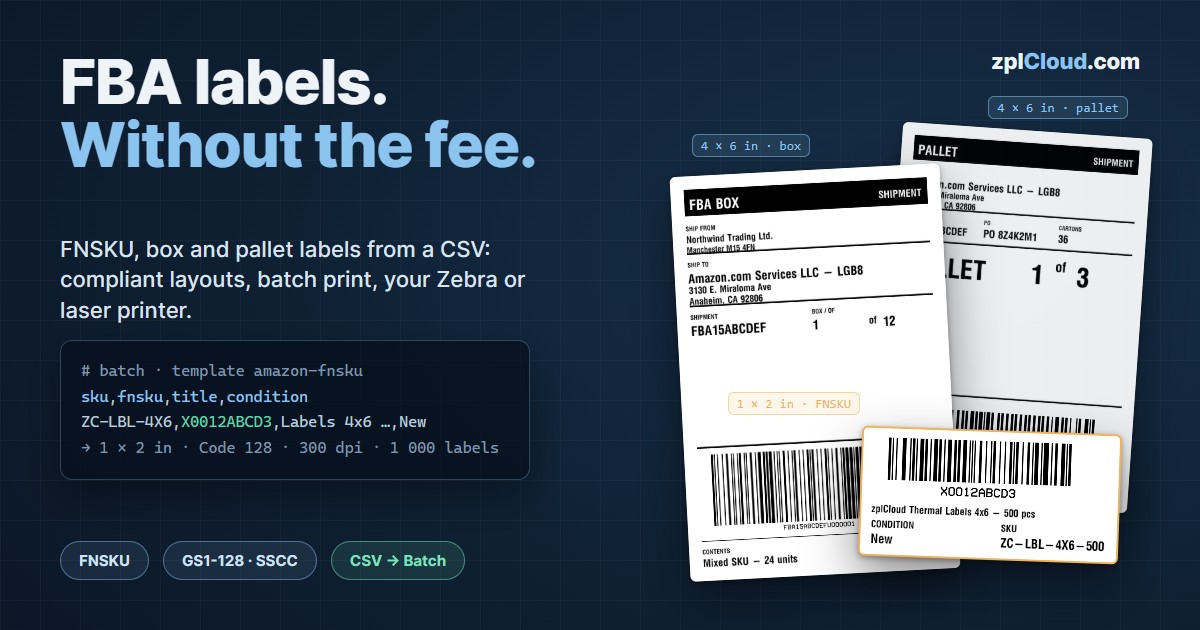
Every unit you send to Amazon Fulfillment needs an FNSKU label, every carton a box label, every pallet four pallet labels. If you skip the labels, Amazon's FBA Label Service applies them for you - at a per-unit price that turns a 1,000-unit shipment into a three-digit invoice, every time. Units that arrive with unreadable or wrong labels are relabelled at a similar per-unit fee and flag your account.
Sellers who print their own labels pay for label stock and ribbon. The catch was never the printing: it was getting the data out of Seller Central, into a compliant layout and onto a printer in bulk without a ZPL expert. That is exactly the workflow zplCloud now covers end to end.
Three labels, three templates
The template gallery has the three Amazon layouts with sizes and barcodes pre-configured:
- Amazon FNSKU label - 1 × 2 in, Code 128 with interpretation line, title and condition. 203 or 300 dpi.
- Amazon FBA box label - 4 × 6 in, ship-from / ship-to, shipment ID, "Box n of m", Code 128 box ID.
- Amazon pallet label - 4 × 6 in, "Pallet n of m", Code 128 shipment ID - or SSCC as GS1-128 (00) for vendors shipping with an ASN.
Every text on them is a field. Bind the fields to the columns of your Seller Central export (sku, fnsku, product-name, condition, shipment_id, box_no, …) and the batch run prints one label per row, in order, with Chrome-style page ranges and automatic reprint on a jam.
Amazon's own ZPL is welcome too
Seller Central hands out box labels as PDF or ZPL. Both routes work: paste the ZPL into the free ZPL to PDF tool to print it on a laser printer, or import it into the designer (ZPL to design), where Amazon's barcode stays exactly where it is and you add your own fields around it - purchase order, warehouse bin, SKU list, pallet number. Vendor Central routing labels that come out wrong on a standard printer are re-rendered for your printer's dpi and label size the same way.
Catch rejections before the print run
The ZPL linter gained an Amazon FBA profile. It checks what the receiving dock checks: FNSKU pattern (X0 + 8 characters), Code 128 or GS1-128 symbology, interpretation line, quiet zone, module width, label size from ^PW/^LL, darkness range. Run it on your template or on Amazon's file, fix the warnings, print one test label, scan it with your phone - then start the batch.
Any printer, anywhere
- Zebra with Link-OS: connect via Weblink - the printer dials out to the cloud, no port forwarding.
- Any ZPL printer on the LAN or on USB: the zplCloud agent (Windows, Linux, Raspberry Pi, Docker) prints it; the agent only connects outbound.
- Laser printer: export the batch as a PDF sheet.
The whole workflow runs on the Starter plan (10,000 renders per month) and can be tested on the free Developer plan. Sellers with a warehouse, vendors with several sites and 3PLs with many clients find their own starting points on the new solution pages: Amazon Seller, Amazon Vendor, Warehouse & fulfillment, 3PL.
Guides: Amazon FBA labels · FNSKU label · FBA box label · Pallet label · Why Amazon rejects labels