



 Design & Layout
 Printing
 Cloud Integration / Connections
 Automation

Cloud (SaaS)
Fully managed on zplcloud.com: designer, API, print queue and Print Views - live in minutes, no infrastructure, automatic updates.
- Developer → Pro
- api.zplcloud.com
- print.zplcloud.com
Platform · Cloud Integration / Connections
Cloud, hybrid or on-premises: Zebra Weblink with mTLS, CLI proxy agents, Docker, one-line installers and enterprise security for every site - outbound only, no inbound ports. Connect ERP, databases and message streams: SQL Server and MongoDB through outbound agents, Kafka and Azure Service Bus subscriptions, DHL Internetmarke postage, push channels and e-mail.
Deploy anywhere
zplCloud is containerized and cloud-agnostic. Start on zplcloud.com today, connect your sites with outbound agents, and move the whole platform into your own data center or cloud account when compliance demands it.
Fully managed on zplcloud.com: designer, API, print queue and Print Views - live in minutes, no infrastructure, automatic updates.

Keep printers where they are. Zebra Weblink, CLI agents or the browser print service open a single outbound connection - no inbound ports, no VPN, no firewall changes.

The complete platform as containers in your data center or your Azure, AWS or Google account. Dedicated queue, custom API limits, SSO/SAML, custom ERP/SAP connectors and an SLA.
Ops quick start
zplCloud CLI
The zplcloud CLI applies printer profiles, sends raw ZPL (TCP 9100 / USB) and opens an outbound proxy agent for remote printers - without inbound ports or firewall changes.

zplcloud profiles apply 42 --target 10.0.0.5zplcloud send --target 10.0.0.5 --zpl "^XA…^XZ"zplcloud proxy --agent "Warehouse Berlin"$ curl -fsSL https://zplcloud.com/install-cli.sh | sh
$ zplcloud --version
zplcloud 1.x.y (osx-arm64)$ curl -fsSL https://zplcloud.com/install-cli.sh | sh
$ zplcloud --version
zplcloud 1.x.y (linux-x64)$ curl -fsSL https://zplcloud.com/install-cli.sh | sh
# auto-detects 32/64-bit (arm → linux-arm, arm64 → linux-arm64)
zplcloud 1.x.y (linux-arm64)PS> irm https://zplcloud.com/install-cli-pshell | iex
>> Installing: %LOCALAPPDATA%\zplcloud\zplcloud.exe
zplcloud 1.x.y (win-x64)The generated compose file below uses these values.
services:
  zplcloud-agent:
    image: docker.zplcloud.com/zplcloud-agent:latest
    container_name: zplcloud-agent
    restart: unless-stopped
    environment:
      ZPLCLOUD_API_KEY: "sk_zplcloud_CHANGE_ME"   # from the API tab
      ZPLCLOUD_AGENT: "PI"                        # name in Remote Printers
      ZPLCLOUD_API_BASE: "https://api.zplcloud.com"
      ZPLCLOUD_LOG: "true"                      # daily log file
      ZPLCLOUD_LOG_DIR: "logs/zplcloud-logs"
    volumes:
      - ./logs/zplcloud-logs:/logs/zplcloud-logs
      - /dev/bus/usb:/dev/bus/usb   # USB access (libusb)
    #privileged: true                            # simplest USB path

$ docker compose -f docker-compose.agent.yml up -d
✔ Container zplcloud-agent  Started
Docker Compose
Runs on any Docker host: 64-bit Raspberry Pi, Synology NAS, Intel or Apple Silicon Mac. The image is multi-arch (linux/amd64 + linux/arm64), public and pullable without login - no .NET SDK needed.
docker compose -f docker-compose.agent.yml up -dImage: docker.zplcloud.com/zplcloud-agent:latestUSB printers: privileged: true or a udev ruleWeblink
Download your printer's three Weblink NRD files and push them to the device via TCP 9100: ~DYE upload, SGD settings (URL, NTP, time) and reset - done. The script is generated server-side for your printer and requires a valid API key.
Windows: weblink-deploy.ps1 (PowerShell 5.1+)macOS / Linux / Raspberry Pi: weblink-deploy.sh (bash)Option: &ip=10.0.0.5 overrides the TCP targetThe generated commands below use these values. Hostname not resolving on your network? No problem - just deploy with the IP: it becomes &ip=… and overrides the TCP target, the hostname still selects the certificate.
PS> irm "https://zplcloud.com/weblink-deploy.ps1?hostname=printer01&apikey=sk_zplcloud_XXXX&ip=" | iex
[2026-08-22 09:00:00] SUCCESS - certificates installed on the printer
$ curl -fsSL "https://zplcloud.com/weblink-deploy.sh?hostname=printer01&apikey=sk_zplcloud_XXXX&ip=" | bash
[2026-08-22 09:00:00] SUCCESS - certificates installed on the printer$ curl -fsSL "https://zplcloud.com/weblink-deploy.sh?hostname=printer01&apikey=sk_zplcloud_XXXX&ip=" | bash
[2026-08-22 09:00:00] SUCCESS - certificates installed on the printer$ curl -fsSL "https://zplcloud.com/weblink-deploy.sh?hostname=printer01&apikey=sk_zplcloud_XXXX&ip=" | bash
[2026-08-22 09:00:00] SUCCESS - certificates installed on the printerSecurity & governance
Every printer, key and job is scoped to its owner. Certificates are validated at the TLS handshake, access is role-based and every render is metered.

The Weblink accepts only registered, non-revoked client certificates issued by its own CA. Revoke by serial and the printer is blocked immediately.

Keys per user, team or company, sandbox and live, rate and body limits, and a usage dashboard for every render and print job.

Admin and Member roles with invitations; printers, designs and Print Views are scoped to the owning team or company.

TLS 1.2 / 1.3 everywhere, automatic Let's Encrypt certificates, 12-character password policy, e-mail confirmation and anti-forgery protection.

Label history, print logs and webhook delivery overviews - 7 days on Developer, 30 days on Starter, 90 days plus audit logs on Pro, unlimited on Enterprise.
Run the platform in your own data center or cloud account, connect databases only through outbound agents, and get SSO/SAML on request with Enterprise.
Data hub & streaming
Connect the systems you already run. Five databases stay in your LAN and are queried through outbound agents, seven message buses are consumed in the cloud and turned into printed labels - no polling, no middleware.

SQL Server, MongoDB, PostgreSQL, MySQL and MariaDB - through the CLI agent with pushdown filters and parameters. Connection strings never leave your network; reachable cloud databases can also be used directly. Used by print views, DHL lookups and batch.

Kafka, Azure Service Bus, MQTT, AMQP 1.0, RabbitMQ, Amazon SQS and Google Pub/Sub. Every JSON message becomes a record, fills the bindings of a design and prints - or carries a ZPL envelope for raw printing.

A message may point at a file in S3 or Azure Blob instead of carrying the ZPL. The other way round, an output target stores every printed label there and reports it by message or webhook.

Render by design ID with your own records through the REST API, receive HMAC-signed webhooks, or drop ZPL files into a watched folder - three ways for any integration layer.
{
  "orderId": "2026/084712",
  "sku": "88-12345",
  "qty": 120,
  "route": "NO OSL 07"
}
→ record → design #42 → ZPL → ZD421 "Warehouse Berlin"
✓ printed · 41 ms · offset 18 402 committed{
"schemaVersion": 1,
"printer": "*", // one id or all printers
"zpl": "^XA^FO50,50^A0N,40,40^FDHello^FS^XZ"
}
Service Bus: PeekLock → complete after print → dead-letter after 3 failuresConnectors
Labels are created where the data already lives. zplCloud speaks five databases, seven message buses and two object stores - through an outbound agent inside your own network or straight from the cloud.
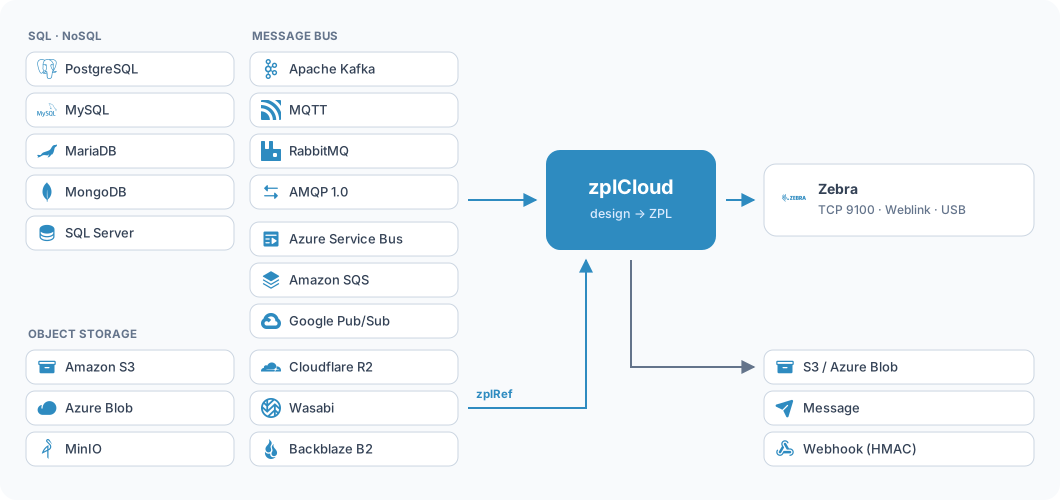
Through the agent the credentials stay inside your network, only result rows leave it. Reachable cloud databases can also be connected directly, with no agent at all.
SQL Server
 MongoDB
 PostgreSQL
 MySQL
MySQL
 MariaDB
Every incoming message becomes a record, fills a design and prints - or carries finished ZPL. Nothing is acknowledged until the label has reached the printer.
 Apache Kafka
 Azure Service Bus
 MQTT
MQTT
 AMQP 1.0
 RabbitMQ
 Amazon SQS
 Google Pub/Sub
Both directions: fetch the print file from the bucket, or drop the printed ZPL into it. S3-compatible, so MinIO, Cloudflare R2, Wasabi and Backblaze work too.
 Amazon S3
 Azure Blob Storage
 MinIO
MinIO
 Cloudflare R2
 Wasabi
 Backblaze B2
Large print files do not belong inside a bus message. Instead of embedding the ZPL, the message points at it - and it is fetched at print time.
{
  "schemaVersion": 1,
  "printer": "*",
  "zplRef": { "storage": "archiv", "key": "auftraege/4711.zpl" }
}After every successful print zplCloud can do three things, individually or together:
New · Integrations
Real Deutsche Post stamps directly from zplCloud: buy and print them as PDF or ZPL - against your own Portokasse, from the app, REST API, Print View or CLI. Explained compactly - the details live in the docs.
Real stamps against your own Portokasse - Standardbrief to EinschreibenAs PDF or ready-to-print ZPL for Zebra (203 dpi)DHL-only Print Views with order lookup from your SQL Server (data hub)Transaction log with voucher, costs, balance, PDF reprint and Send ZPL

All features
Designer, converters, print control, batch, webhooks, push and API - everything in one platform. New features are marked with NEW.
 Administration & Security
Invitations and roles (Admin/Member) with access to company printers.
Title, logo, favicon and UI customization per domain via branding.json.
Saved designs with description, schema version and ⚠-hint for outdated layouts.
API usage, subscription status and system overview at a glance.
Automatic HTTPS certificates (HTTP-01) for all zplcloud domains plus ACME printer certificates.
Password policies (2026 standard), email confirmation, anti-forgery and JSON error handling.
Design your first label in minutes. Enterprise: private deployment, SLA and SSO/SAML on request.
Free Developer plan · no credit card · cancel anytime


