



zplCloud Blog
The zplCore.com Engine Is Here: zplCloud's Label Engine as a .NET SDK
The engine behind every zplCloud preview is now available for your own applications: ZPL II and EPL2 rendering measured against printer-accurate references, 144 symbologies, compliance pre-check, scan-proof, printer twin, label tests in CI and an MCP server for coding agents.
The engine behind zplCloud is now an SDK
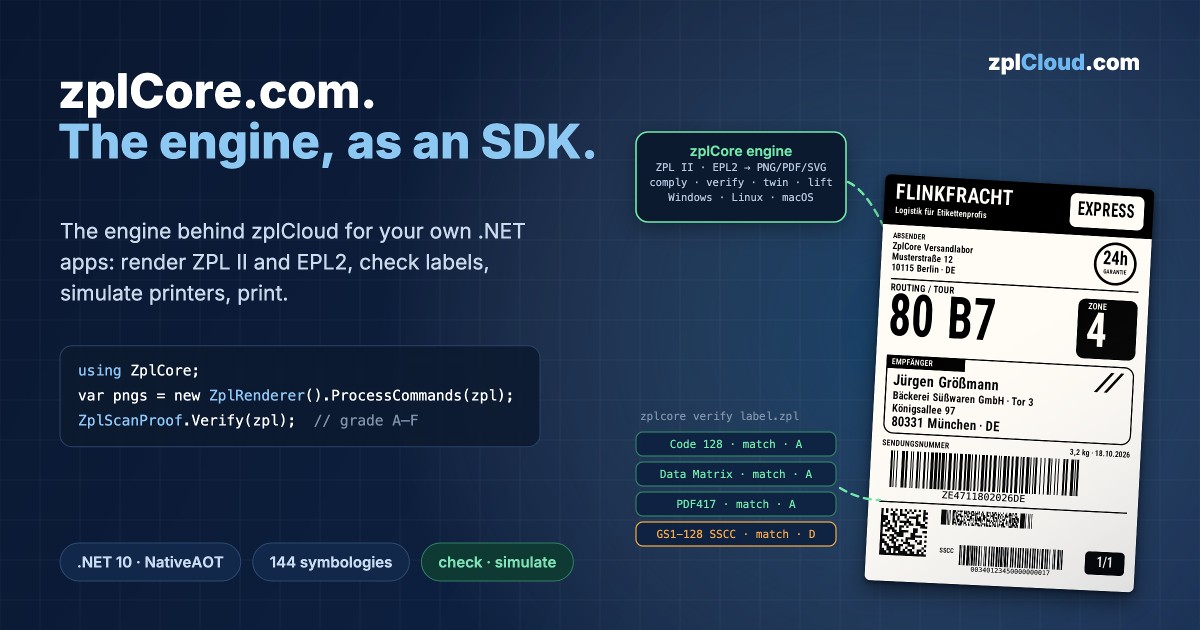
Every preview and every PDF on zplCloud is rendered by one engine: zplCore.com. Starting today it is available as a .NET 10 SDK for your own applications, with every feature zplCloud uses: render ZPL II and EPL2 to PNG, PDF and SVG, build labels from data, check them against GS1 and carrier rules, read every barcode back, simulate printers including faults, and print. It runs on Windows, Linux and macOS, in Docker and Kubernetes, without a printer driver.
In short: zplCore.com is a .NET library plus a CLI, a test package and an MCP server. It renders like a virtual Zebra printer and is measured against printer-accurate references. On top of rendering it checks and simulates: compliance pre-check, scan-proof, printer twin, chaos printer, label tests in CI. A trial version is available on request at zplcore.com.
Why zplCloud built its own engine
Until October 2026, zplCloud used the ThermalLabel and ZPLPrinter SDKs from Neodynamic for previews and for turning designs into ZPL. Today zplCore.com is the only engine in zplCloud: the designer produces ZPL, and the PNG, SVG and PDF previews render exactly that ZPL. What you see in the preview is what goes to the printer. There is no second image path any more.
We had three reasons:
- The printer is the yardstick. zplCore is compared pixel by pixel, with a 2-dot tolerance, against printer-accurate reference renders from Labelary: a mean score of 0.986 over 169 test cases, 131 of them at 0.99 or better and 85 pixel-identical. Automated tests keep every case at least at its current score.
- Rendering alone is not enough. A label can look right and still fail: a barcode in the quiet zone, a field outside the printhead, an SSCC with the wrong X-dimension. We wanted an engine that answers these questions itself, offline and inside the build.
- One code base for the cloud and for your own servers. The functions behind the free zplCloud tools are the same ones you get in the SDK.
zplCore.com is an independent implementation based on the public ZPL II specification and the symbology standards. It contains no code from other commercial vendors; the open-source components it uses are listed in its third-party notices.
What zplCore.com is
| Area | Contents |
|---|---|
| Platform | .NET 10; tested on Windows 11, macOS, Debian and Azure Linux 3.0 (including distroless); Dockerfile and Helm chart included; NativeAOT-compatible |
| Input | ZPL II and EPL2; EPL forms can be converted to ZPL |
| Output | PNG, JPEG, WebP, BMP, GIF, PDF and SVG (both as vectors), TIFF, PCX, PCL, GRF, EPS, HTML, plus EPL, Fingerprint and ESC/POS |
| Barcodes | 144 symbologies, from Code 128, GS1 DataBar and QR to MaxiCode, DotCode and Han Xin; GS1 parser and validator with 534 application identifiers |
| Labels from data | label model in mm or inches, JSON templates, data binding to C# objects, EF Core, LiteDB, MongoDB and JSON, streaming with constant memory |
| Printing | TCP 9100, serial, USB, Windows spooler, CUPS; ~HS/~HQES status; a virtual printer on TCP 9100 |
| Scripts | HarfBuzz shaping and bidi for Arabic, Hebrew, Thai, Indic scripts and CJK |
A few lines of C# to a preview:
using ZplCore;

var renderer = new ZplRenderer(new ZplRenderSettings { Dpi = 203 }.WithLabelSizeMm(100, 150));
List<byte[]> pngs = renderer.ProcessFile("labels.zpl");          // one PNG per label

renderer.Settings.OutputFormat = ZplOutputFormat.Pdf;             // one PDF, one page per label
File.WriteAllBytes("preview.pdf", renderer.ProcessFile("labels.zpl")[0]);
What "printer-accurate" means in detail:
- QR Codes (
^BQ, model 2) are module-identical with the Zebra output: mode selection, version, error correction and mask, verified on more than 3,600 Labelary reference symbols. - PDF417 (
^B7) and MicroPDF417 (^BF) are codeword-identical with Labelary, with Zebra's compaction. - Character sets (
^CI) and^FHwork as on the printer: without^CIthe label is Code Page 850,^CI0to^CI12replace the national characters, the Windows code pages follow the ZPL guide, and under^CI28the 2D symbols carry the bytes the printer encodes. - Zebra behaviour reproduced: advance widths of font 0, the QR position offset by the
^BYheight, Code 128 mode N staying in subset B, wide bars asfloor(ratio × module).
It is fast, too. In a release build on an Apple M3 Max, zplCore generated up to 199,000 labels per second as ZPL (stored format, 100,000 labels in one job) and more than 5,000 PNG previews per second with 10 threads. Each measurement can be repeated with a single command.
A tour of the features
All images and outputs in this section come from the engine itself: from the zplCore documentation, the zplCore CLI or the free zplCloud tools.
Compliance pre-check
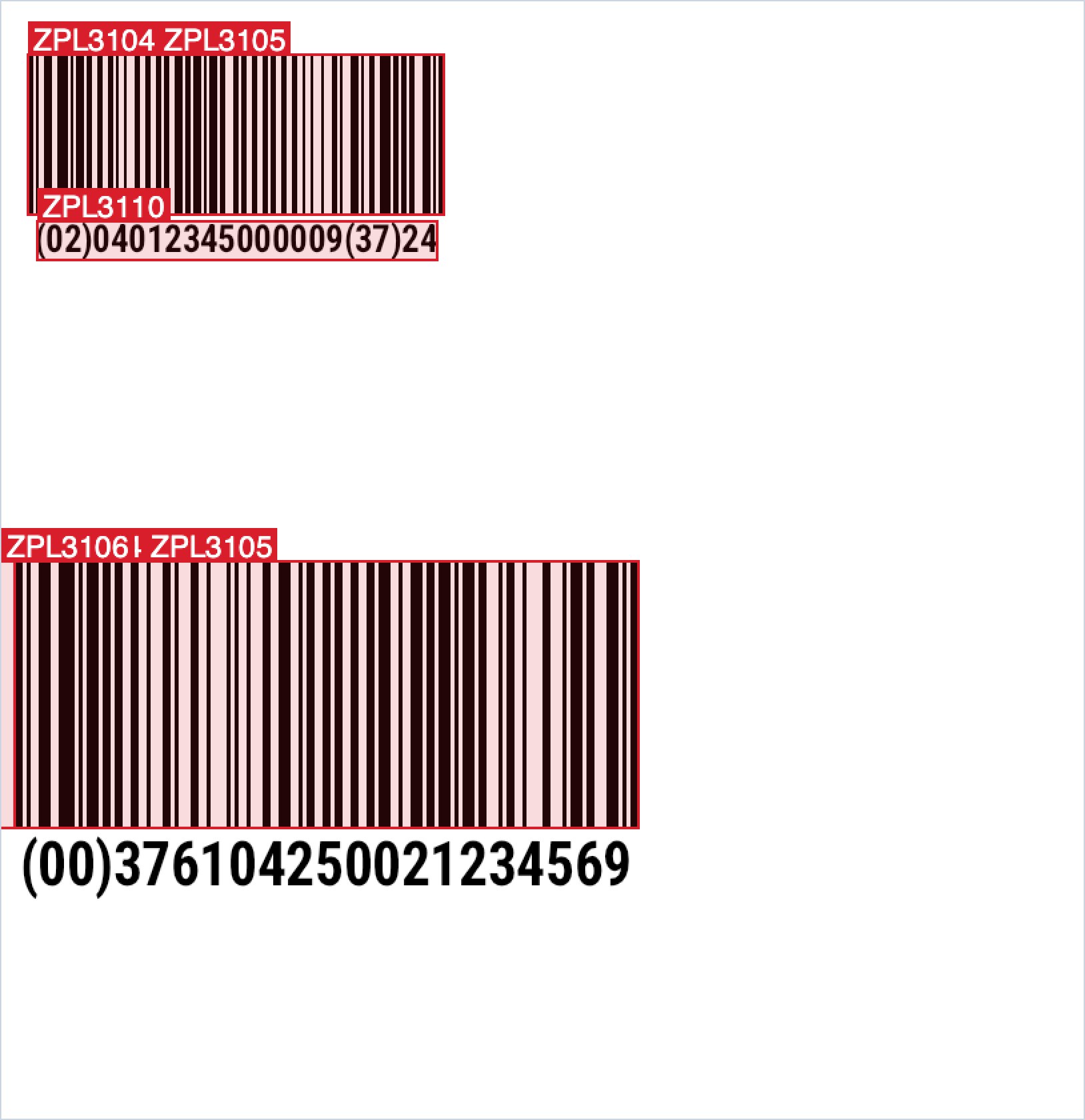
ZplCompliance.Check checks a label against 84 rules in 8 packs: GS1 logistic label, Sunrise 2027 with GS1 Digital Link, Amazon FBA, UPS MaxiCode, FedEx and DHL Paket basics, UDI and RFID/EPC. It measures the rendered label rather than reading the text: X-dimension in mm, bar height, quiet zones, HRI size, AI formats and check digits. Every finding has a rule ID, line, position and source, as text, JSON, SARIF 2.1.0 or an annotated PNG like the one above. Here is the sample from our free Label Compliance Check:
$ zplcore comply pallet.zpl --pack gs1-logistic --dpi 203
pallet.zpl:13:1: error ZPL3104: label 1 ^BC: X-dimension 0.25 mm (2 dot(s) at 203 dpi) is below the minimum 0.495 mm for logistic units (0.250 mm only if the unit is physically too small). [GS1 General Specifications 26.0 §5.12.3.5 Table 5-51]
    fix: Use ^BY4 or wider at 203 dpi.
pallet.zpl:15:1: error ZPL3106: label 1 ^BC: GS1-128 needs 10X quiet zones: the left quiet zone (30 dots = 3.754 mm) runs 20 dot(s) past the label edge. [GS1 General Specifications 26.0 §5.4.4.2, §5.4.6.3, Table 5-51]
    fix: Move the barcode or the neighbouring field, or reduce ^BY.
1 label(s) at 203 dpi, packs gs1-logistic GenSpecs 26.0 / LLG 1.3: 6 error(s), 0 warning(s), 2 info(s). Pre-check only, not a certification.
The output is shortened to two of the six errors. The Sunrise 2027 pack checks 2D barcodes at the retail checkout; our post GS1 Sunrise 2027: 2D Barcodes at the Checkout shows it in detail. Important: this is a pre-check, not a certification. It does not replace approval by a carrier or authority, nor a verifier on the printed label. Documentation
Scan-proof
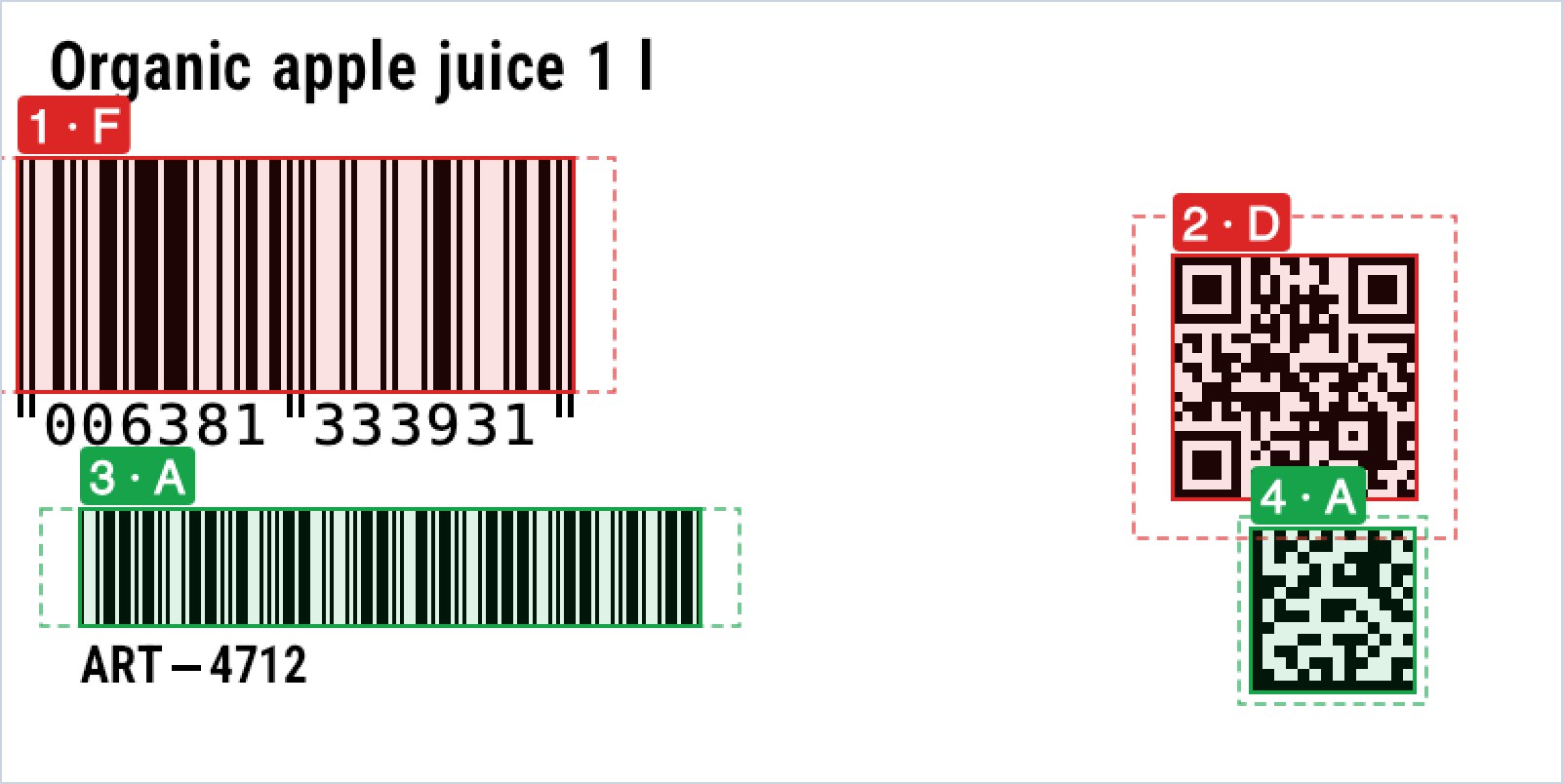
ZplScanProof.Verify reads every barcode back from the rendered bitmap with two independent decoders (zxing-cpp and ZXing.Net) and compares the result with the field data. It measures X-dimension, quiet zones, bar height, clipping and overlaps, and gives a grade from A to F: a digital pre-check modelled on ISO/IEC 15415/15416, computed at printer resolution. In the example from our free Barcode Scan-Proof all four barcodes decode, yet two would cause trouble (output shortened):
$ zplcore verify shelf.zpl --dpi 203
[0.0] ^BE EAN-13 line 7 at 8,80 (285×120 dots, 0°)
  status: Match   digital grade: F (0.0)
  SP1101 error: Quiet zone left: 2.7X, 11X required (ISO/IEC 15420 / GS1); limited by the label edge.
  SP1102 error: The symbol is cut off by the label edge (129 pixels of its ink lie outside ^PW/^LL).
[0.1] ^BQ QR Code line 8 at 600,10 (125×245 dots, 0°)
  status: Match   digital grade: D (1.0)
  SP1101 warning: Quiet zone bottom: 3X, 4X required (ISO/IEC 18004); limited by other ink.
The Code 39 gets an A but a warning: the text "ART-4712" next to it looks like its interpretation line but differs from the encoded "ART-4711". The grade does not replace a calibrated verifier on the printed label. Documentation
ZPL to an editable label model
Label.FromZpl turns existing ZPL into an editable, data-bound template: text, barcodes, shapes, images and RFID become typed items, ^FN fields become data fields and ^DF formats become templates. Each item is checked pixel by pixel against the original; all 318 files of the test corpus come back pixel-exact. The shipping label from the banner, for example:
$ zplcore import hero-label.zpl -o label.json --report
1 label(s), 203 dpi (LabelSize), fidelity 1,0000
  label 1: fidelity 1.0000 pixel-exact, 38 typed, 0 raw item(s)
  Info: Resolution detected as 203 dpi from the label width
zplCloud uses exactly this for importing ZPL into the designer (more below). Documentation
Label understanding and GDPR redaction
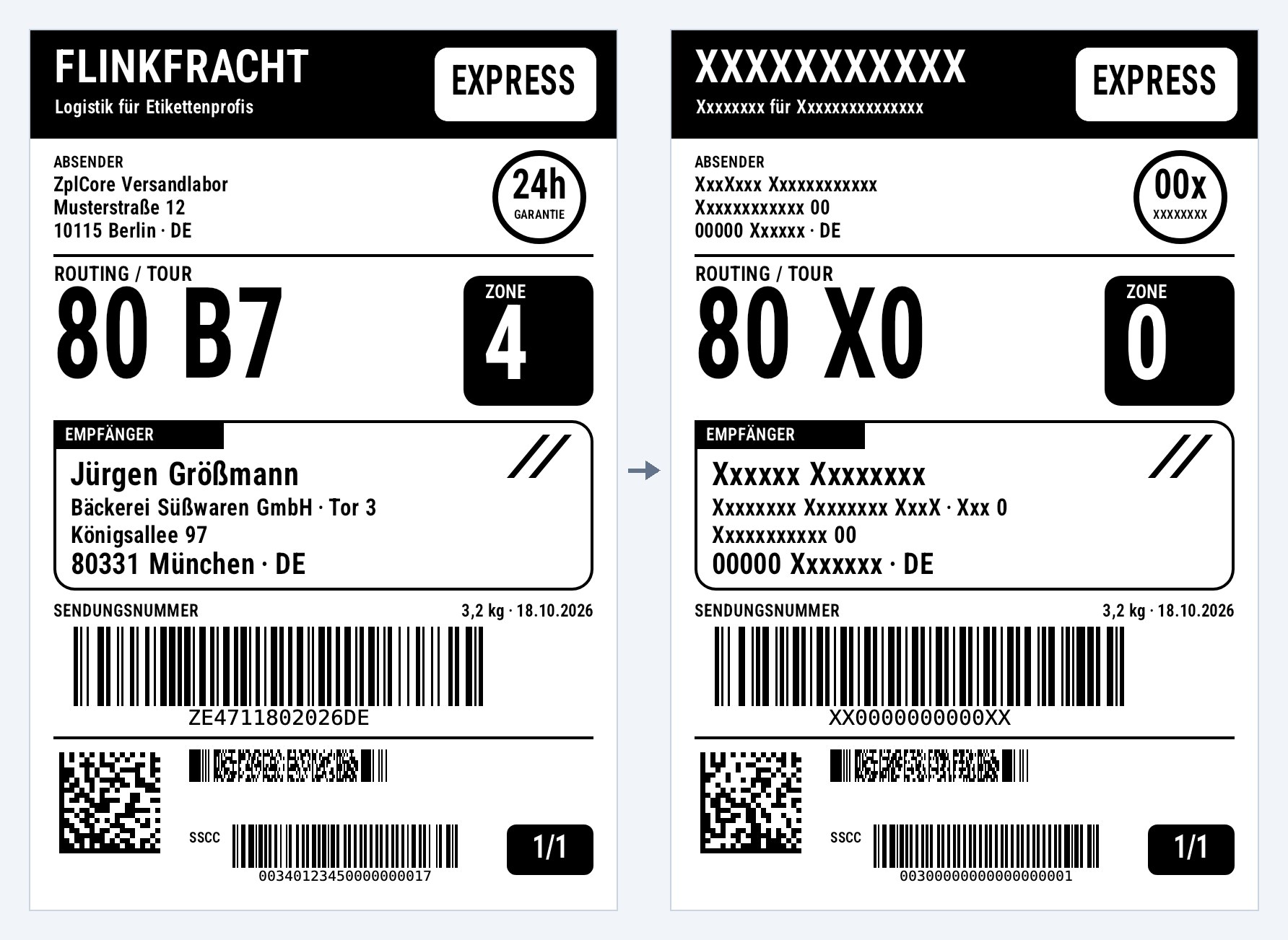
ZplExtract reads recipient, sender, tracking numbers with check digits, SSCC, GTIN, dates and weights from ZPL, each with its location and a confidence value. For the label above it finds the recipient address with confidence 0.95, the SSCC 340123450000000017 from GS1 AI (00) with a valid check digit, the weight and the date. ZplRedact replaces personal data in the same layout, including ^FX comments, ^DF/^XF data and 2D barcode contents, puts valid dummy barcodes in, and then searches again: for this label 28 actions, 29 values searched, 0 left. It is rule-based and works without a network; please review the result before sharing it, and text inside images is not read. Documentation
GS1 Digital Link and Sunrise 2027 migration
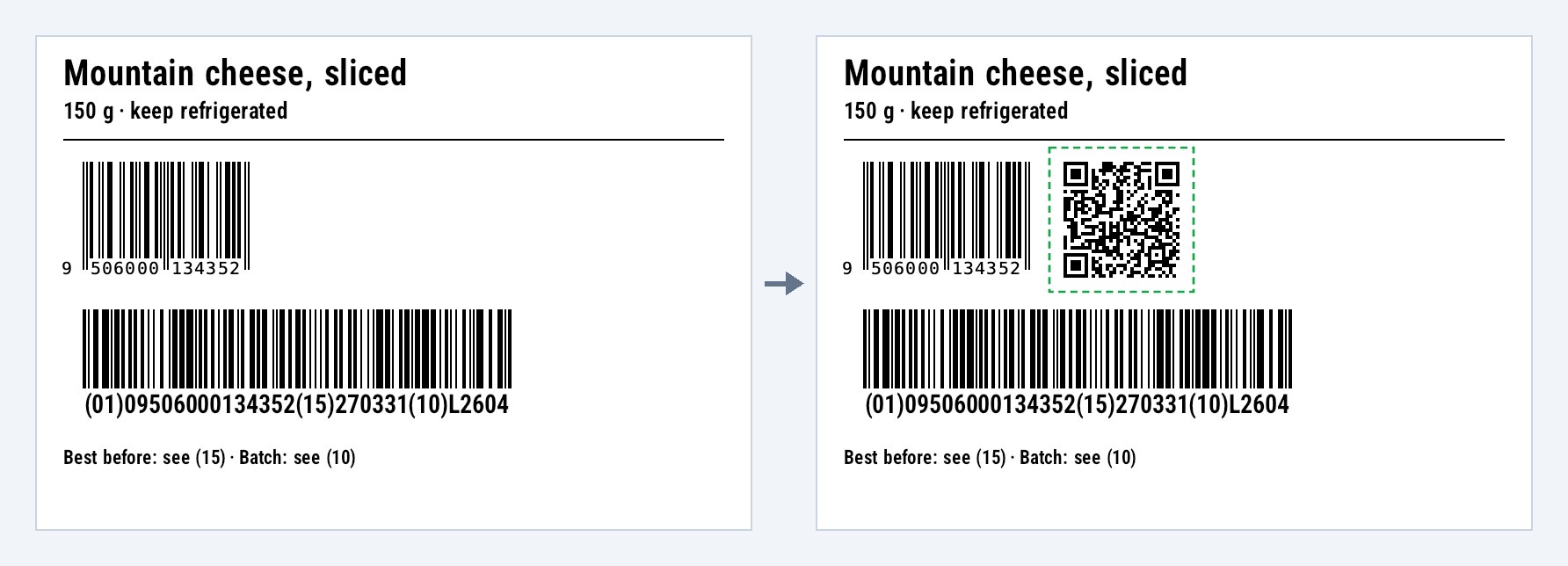
ZplGs1Migration.Migrate finds the GTIN in an EAN/UPC, GS1-128, ITF-14 or GS1 DataBar and adds a QR Code with a GS1 Digital Link URI or a GS1 DataMatrix in free space, with its quiet zone and a Sunrise pre-check of the result. Batch and best-before date are taken over from the GS1-128 on this label (output shortened):
$ zplcore gs1 migrate cheese.zpl -o cheese-2d.zpl
label 1: migrated – added a QR Code with GS1 Digital Link URI with GTIN 09506000134352 right of the EAN-13 (^BE, line 9), top-aligned with the bars
  uri: https://id.gs1.org/01/09506000134352/10/L2604?15=270331
sunrise pre-check of the migrated ZPL: 0 error(s), 0 warning(s), 0 info(s)
In zplCloud the free Sunrise 2027 Migration tool does the same in the browser. A migration assistant, not a certification. Documentation
RFID Studio
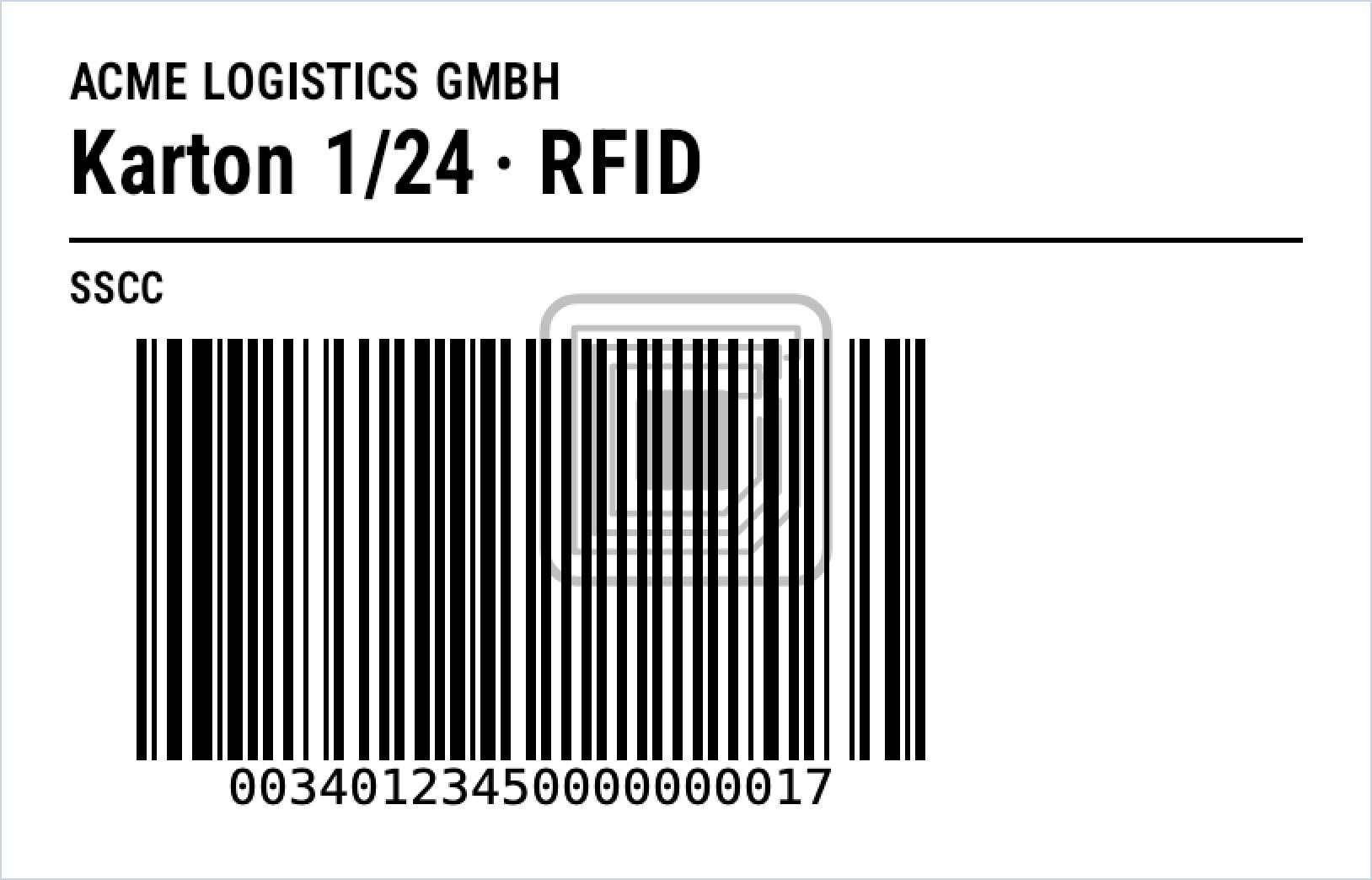
ZplRfid encodes and decodes EPCs according to the GS1 EPC Tag Data Standard 2.3 (SGTIN, SSCC, SGLN, GRAI, GIAI and the TDS 2.0 "plus" schemes) and generates the matching ^RF commands. The consistency check compares the tag with the printed label. In this example the tag would receive a different SSCC than the barcode shows:
$ zplcore rfid check carton.zpl
carton.zpl:6:1: error ZPL3904: label 1 ^RF: The SSCC-96 EPC encodes SSCC (00) 340123450000000024, but ^BC prints 340123450000000017. [GS1 EPC Tag Data Standard 2.3 §7 (correspondence of EPC and GS1 keys); GS1 General Specifications 26.0 §4.13]
    fix: Encode the printed key, e.g. ZplRfid.EncodeEpc("(00)340123450000000017…") or 'zplcore rfid encode'.
zplcore rfid simulate runs the RFID commands of a label against a simulated Gen2 tag, like an RFID printer would. Documentation
Printer twin
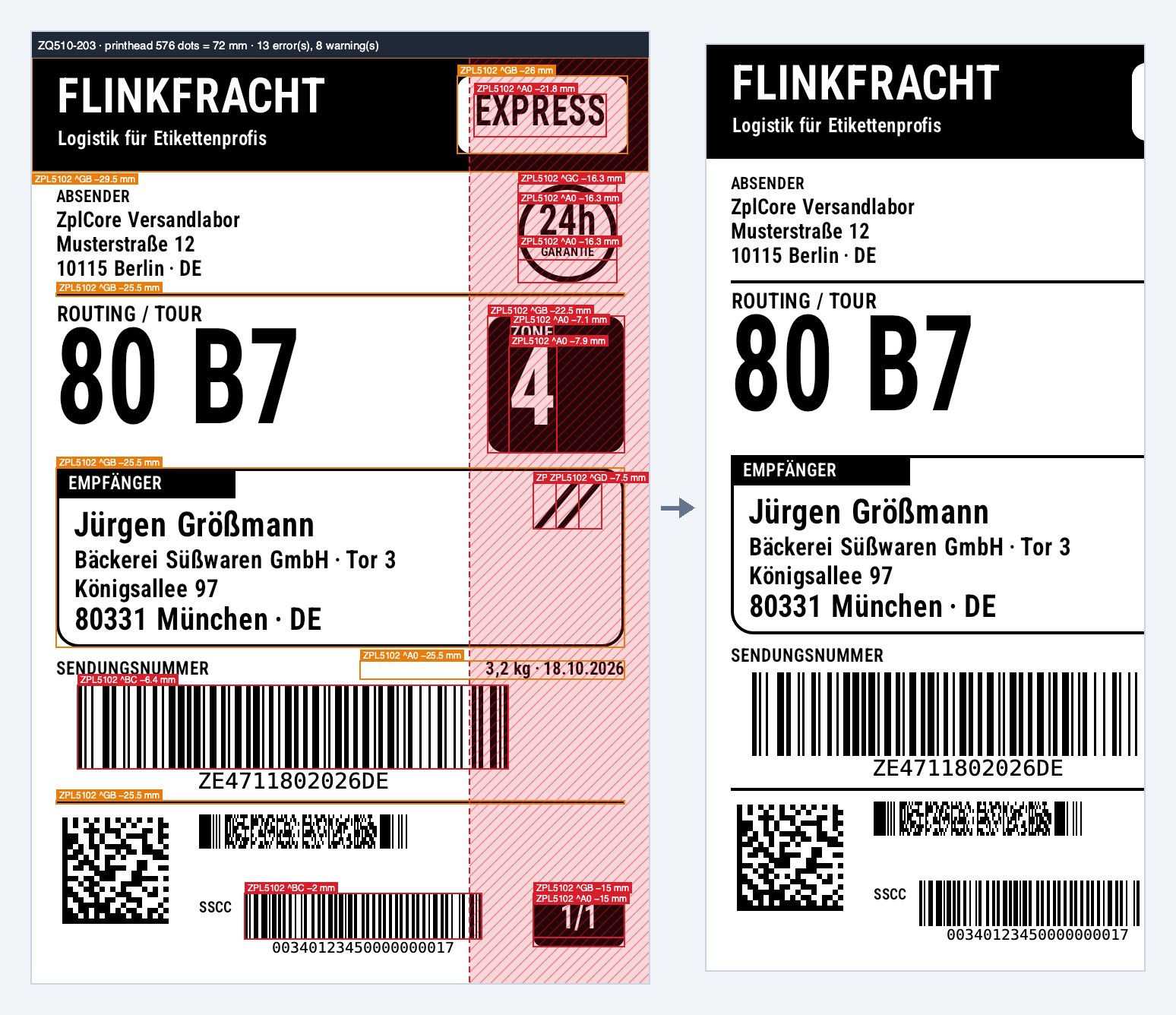
Will this label print on this model? ZplPrinterTwin.Check compares a label with one of 24 profiles (including ZD421, ZD621, ZT411, ZT610, ZQ630 and three generic profiles) and reports fields outside the printhead width, missing options such as cutter or RFID, firmware limits, fonts and memory, plus an estimate of the print time. Every profile fact is backed by a cited source or marked as unknown. The 4 × 6 inch label above on a printer with a 72 mm printhead (one of 21 findings shown):
$ zplcore twin check hero-label.zpl --profile ZQ510-203
  ZPL5102 error (53:1): Label 1: ^BC ">;>800340123450000000017" at x=280 is 16 dots (2 mm) wider than the printhead of ZQ510-203 (576 dots = 72 mm): the right part is cut off; a clipped barcode does not scan.
ZQ510-203: 13 error(s), 8 warning(s), 0 info
Chaos printer and cutter preview
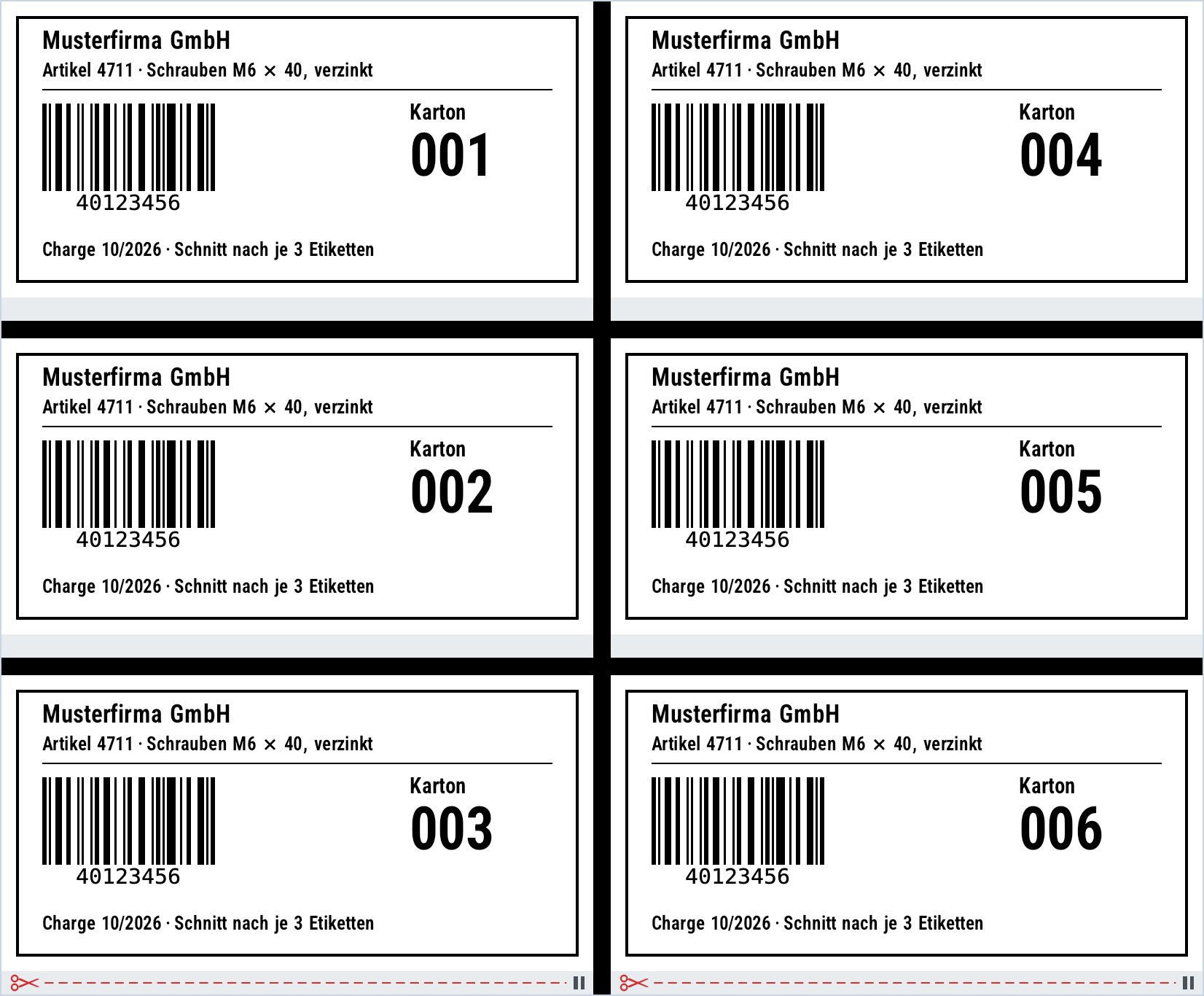
ZplVirtualPrinter listens on TCP 9100, renders incoming jobs and answers ~HS and ~HQES like a printer. On request it fails: paper or ribbon out, head open, buffer full, cutter jam, RFID void, disconnects, timeouts, scripted and reproducible:
printer.Faults.Schedule(ZplFaultKind.PaperOut, ZplFaultTrigger.AfterLabels(3)); // label 4 waits
printer.Faults.Seed = 42;                                                       // deterministic random triggers
The cutter simulation shows where a printer with a cutter cuts (^MM, ^PQ, ^CN, ~JK and more) and draws the cuts into PNG, SVG and PDF previews, as above: ^MMC with ^PQ6,3 cuts after labels 3 and 6. Chaos printer · Cutter
Testing+ and GitHub Action

Labels are code, so test them like code. The ZplCore.Testing package works with xUnit, NUnit and MSTest:
ZplAssert.Label(zpl)
    .NoOverlaps()
    .Complies(CompliancePacks.Gs1LogisticLabel)
    .Barcode("SSCC").Decodes("(00)376104250021234569").HasGrade(atLeast: 'B')
    .And.MatchesSnapshot("pallet");
A failure names the element, its position and the ZPL line, and links an image with the element outlined. zplcore check runs the same checks over many files and writes JUnit XML, SARIF and Markdown. The GitHub Action included in the SDK comments on pull requests with before/after/diff images and lists what changed. The images above come from such a run: a change narrowed the SSCC barcode from ^BY4 to ^BY3 and changed its data (output shortened):
$ zplcore check labels/pallet.zpl --pack gs1-logistic --verify --baseline ../base
FAIL labels/pallet.zpl (1 label(s), 0.25 s) · changed vs baseline (3 element change(s))
  FAIL comply gs1-logistic
    labels/pallet.zpl:12:1: error ZPL3104: Label 1: X-dimension 0.375 mm (3 dot(s) at 203 dpi) is below the minimum 0.495 mm for logistic units (0.250 mm only if the unit is physically too small).
    labels/pallet.zpl:12:1: note ZT3001: Label 1: barcode ^BC Code128 at x=86 y=820: data "(00)376104250021234569" → "(00)376104250021234576"
FAILED (fail-on error)
MCP server for coding agents
zplcore-mcp gives Claude Code, Claude Desktop, VS Code with GitHub Copilot and Cursor 26 tools via the Model Context Protocol: render, lint, format, diff, compliance, scan-proof, redaction, printer twin, GS1 and RFID, among others. An agent writes ZPL, looks at the PNG, reads the diagnostics and fixes the label in a loop.
claude mcp add zplcore -- zplcore-mcp
The server is built for untrusted input. It speaks only stdio and opens no network port. Every call runs in its own worker process with time and memory limits and an empty environment, without access to files, network, printers or environment variables; on macOS an OS sandbox is added. Adversarial tests, fuzzing and an IL audit of the assembly check these rules. Documentation
PDF and SVG to native ZPL (Vector-Lift)
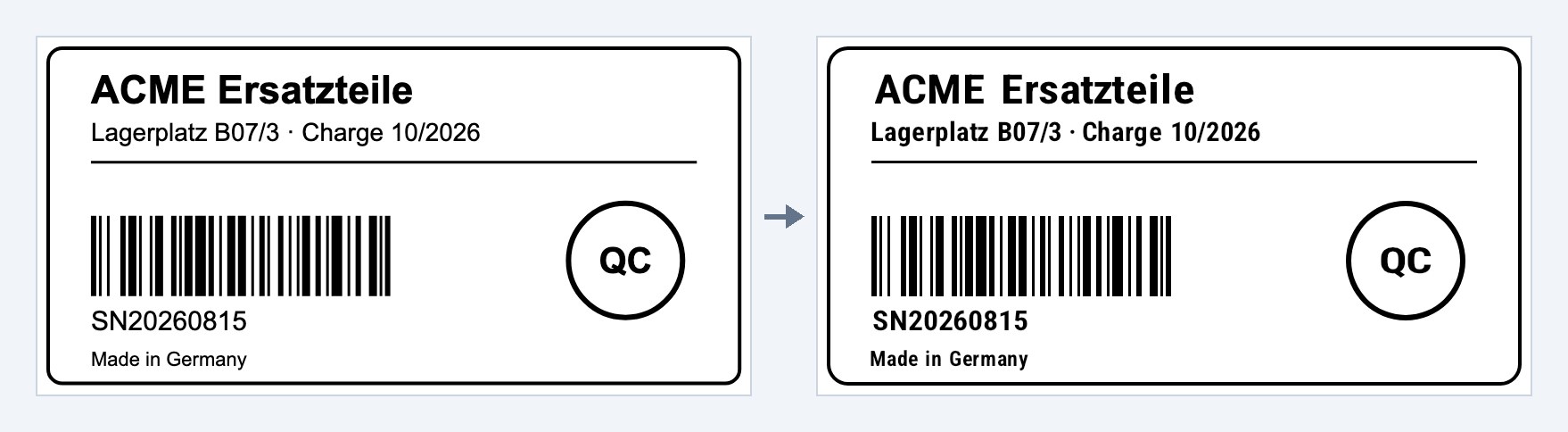
Vector-Lift turns carrier and ERP PDFs or SVGs into real ZPL instead of one ^GF raster image: text as ^A0 fields, barcodes decoded, regenerated as native ^B commands and verified, lines and boxes as ^GB, ^GC and ^GE. Every label comes with a measured fidelity:
$ zplcore lift lift-label.svg -o lift.zpl --report
799x400 dots @ 203 dpi (default), fidelity 0.9785 (exact 0.9114), native ink 97.8 %, 370 bytes vs 4,140 bytes ^GF raster (8.9%)
4 native, 5 approximated, 0 raster, 1 dropped, barcodes match
Text is set in font 0 instead of the original typeface, and text that exists only as outlines in the PDF stays a graphic (no OCR). In zplCloud the free PDF to native ZPL tool uses it. Documentation
NativeAOT
The SDK, the test package, the CLI and the MCP server build with no trim or AOT warnings. The CLI and the MCP server can be published as native programs that start without an installed .NET runtime, and a smoke test compares their output with the JIT version byte for byte and pixel for pixel. Documentation
What it means for zplCloud users
You do not need to install anything; zplCloud runs on zplCore.com today:
- Four new free tools: Label Compliance Check, Barcode Scan-Proof, Sunrise 2027 Migration and PDF to native ZPL. All four are also available through the zplCloud API under
/v1/tools/…. - Preview equals print: PNG, SVG and PDF previews render the same ZPL that goes to the printer.
- Better designer import: importing ZPL into the designer now runs through
Label.FromZpl. In the round trip ZPL → design → ZPL of all 96 templates in 10 languages, the mean score rose from 0.7707 to 0.9998, and the number of pixel-exact templates from 26 to 911 of 960. - The tools you already know such as the ZPL Linter, ZPL Formatter, ZPL Diff and Check barcode work with the same engine.
Coming soon: zplCore Server (Docker)
Next we are packaging the engine as a ready-made container with a REST API: ZPL in, PNG, PDF or a check report out. Planned are a multi-arch image for linux/amd64 and linux/arm64, distroless, running without root and with a read-only file system, endpoints /health, /ready and /metrics (Prometheus), an OpenAPI description and signed images with an SBOM. In our NativeAOT test on linux/arm64 the server started in about 4 ms, rendered its first label in about 11 ms and the image was about 100 MB. The feature set is planned; on zplcore.com you can ask to be notified when the first version is ready.
Try it
- Live demo: zplcore.com/en/demo renders ZPL and runs the compliance pre-check, scan-proof, GS1 migration, extraction with redaction and the printer twin in the browser.
- Documentation: zplcore.com/en/docs with API, CLI, examples, accuracy and known limits.
- Trial version: request it through the contact form on zplcore.com. The development team answers directly and is happy to check your own ZPL and EPL files. Licences are for business customers (B2B).
- Without code: the free zplCloud tools run on the same engine.
Frequently asked questions
Is zplCore.com the same engine zplCloud uses?
Yes. zplCloud renders previews, PDFs and tool results with zplCore.com, and the new tools call the same functions you get in the SDK.
Does zplCore.com need an internet connection or a printer driver?
No. The library runs in your own process, offline, on Windows, Linux and macOS. Printing goes directly over TCP 9100, serial, USB, the Windows spooler or CUPS.
Are the compliance pre-check and the scan grade certifications?
No. The compliance pre-check tests against published rules, and the scan grade is a digital pre-check modelled on ISO/IEC 15415/15416. Neither replaces approval by a carrier, an authority or your GS1 Member Organisation, nor a calibrated verifier on the printed label.
What can zplCore.com not do yet?
Pharmacode 2D, Response Plus PostMatrix and HIBC according to ISO/IEC 15434 are not implemented, because there is no public specification. Deutsche Post BZL and JAB Code are experimental. Zebra's resident fonts are proprietary and are replaced by calibrated substitute fonts; if you need identical glyphs, register the original TTF. The full list is in the known limits.
Do I have to change anything in zplCloud?
No. Designs, templates, printers and API calls stay as they are.
Zebra and ZPL are trademarks of Zebra Technologies Corporation, GS1 and GS1 Digital Link are trademarks of GS1 AISBL, and Neodynamic, ThermalLabel and ZPLPrinter are trademarks of their owners. They are used here descriptively only.