



Amazon & marketplaces
Amazon FBA labels: FNSKU, box and pallet labels explained
Amazon Fulfillment FBA accepts inventory only when three kinds of labels are right: the FNSKU label on every unit, the FBA box label on every carto…
Amazon Fulfillment (FBA) accepts inventory only when three kinds of labels are right: the FNSKU label on every unit, the FBA box label on every carton and, for LTL and FTL shipments, the pallet label. This guide lists the sizes, barcode types and print rules, shows how each label looks in ZPL, and explains how to produce them in bulk with zplCloud - without paying Amazon's per-unit label service.
The three labels at a glance
| Label | Size | Barcode | Where | dpi |
|---|---|---|---|---|
| FNSKU unit label | 1 × 2 in (25.4 × 50.8 mm), minimum 1 × 1 in | Code 128, FNSKU (10 characters, starts with X0) plus title and condition in clear text | on every sellable unit, over the manufacturer barcode if it is visible | 300 dpi recommended, 203 dpi acceptable |
| FBA box label | 4 × 6 in (101.6 × 152.4 mm) | Code 128 / GS1-128 with the shipment and box ID that Amazon generates | on the side of every carton, never on top, bottom or seams | 203 dpi or better |
| Pallet label | 4 × 6 in | Code 128 / GS1-128 (SSCC for ASN shipments) | four labels per pallet, one on each side, plus the box labels | 203 dpi or better |
Amazon states the same rules for all three: white background, black print, no glossy or coated stock that reflects, a quiet zone around the barcode, human-readable text under it, and no placement over seams or over an expiration date.
FNSKU unit label in ZPL
The FNSKU is Amazon's own item identifier (the ASIN with an X0 prefix for most products). The unit label carries the FNSKU as Code 128, the product title (truncated) and the condition:
^XA
^PW406^LL203^CI28
^FO24,18^BY2^BCN,90,Y,N,N^FDX0012ABCD3^FS
^FO24,140^A0N,22,22^FB360,1,0,L^FDzplCloud Thermal Labels 4x6 - 500 pcs^FS
^FO24,170^A0N,20,20^FDNew^FS
^XZ
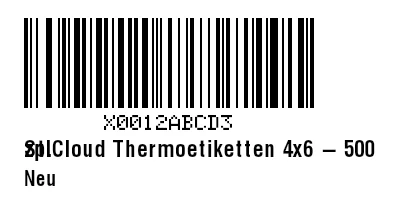
^PW406^LL203 is 2 × 1 in at 203 dpi (at 300 dpi use ^PW600^LL300 and scale the positions). ^BCN,90,Y prints the interpretation line, which Amazon requires. Keep at least 0.25 in (≈ 50 dots at 203 dpi) free left and right of the barcode.
FBA box label in ZPL
Amazon generates the box label content in Seller Central (Send to Amazon → Print box labels). Each label shows the shipment ID, the box number (FBA15ABCDEF U000001), the ship-to fulfillment center and a Code 128 barcode of the box ID:
^XA
^PW812^LL1218^CI28
^FO40,40^A0N,36,36^FDSHIP TO:^FS
^FO40,85^A0N,40,40^FDAmazon.com Services LLC^FS
^FO40,135^A0N,32,32^FDFBA - LGB8^FS
^FO40,175^A0N,32,32^FD3130 E. Miraloma Ave^FS
^FO40,215^A0N,32,32^FDAnaheim, CA 92806^FS
^FO40,300^GB732,3,3^FS
^FO40,330^A0N,28,28^FDShipment: FBA15ABCDEF^FS
^FO40,370^A0N,28,28^FDBox 1 of 12^FS
^FO60,460^BY3^BCN,220,Y,N,N^FDFBA15ABCDEFU000001^FS
^FO40,760^GB732,3,3^FS
^FO40,790^A0N,26,26^FDMixed SKU - 24 units^FS
^XZ
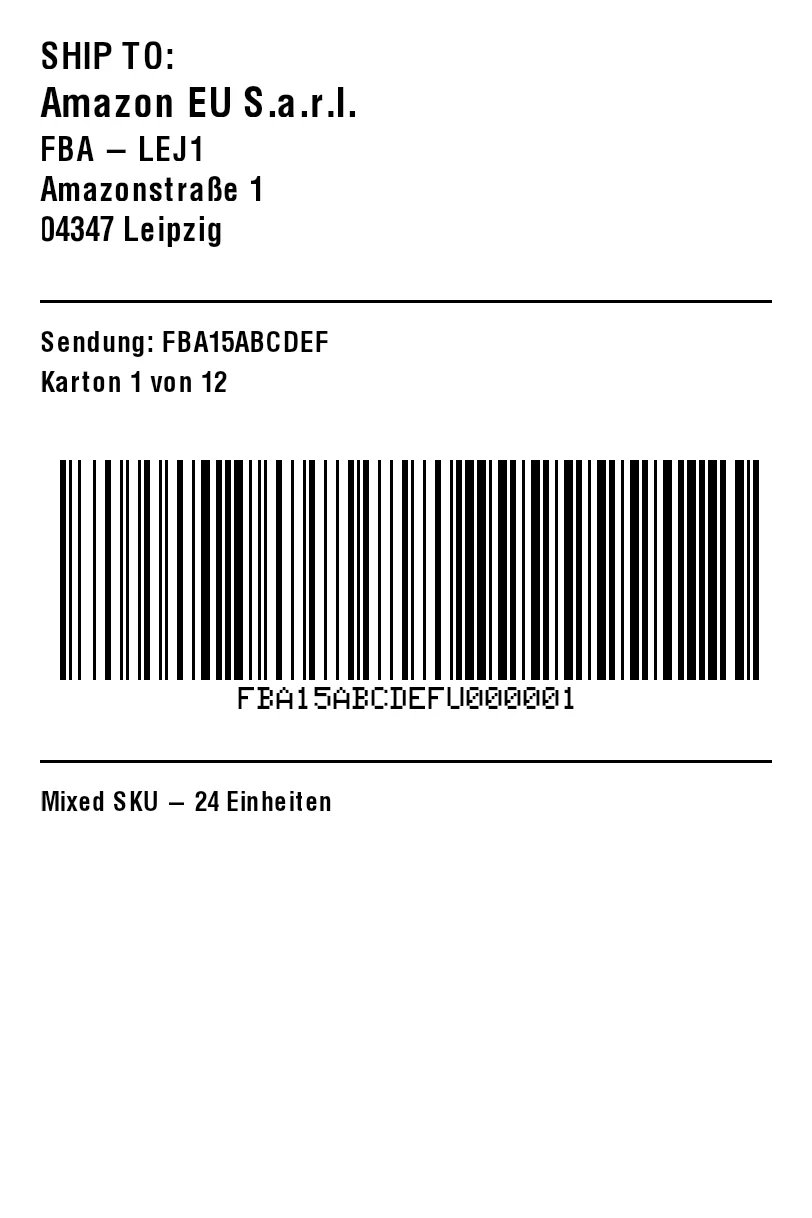
If you receive this label from Amazon as ZPL, paste it into the ZPL to PDF tool to print it on a laser printer, or import it into the zplCloud designer and add your own fields (SKU list, purchase order, bin location) next to Amazon's barcode.
Pallet label
The pallet label repeats the shipment and carton information at pallet level and is placed on all four sides. For vendors shipping with an ASN, the pallet label carries the SSCC as a GS1-128 barcode with application identifier (00): ^BCN,200,Y,N,N,A^FD>;>800340123450000000017^FS.
Why labels get rejected
- Wrong barcode type - the FNSKU must be Code 128, not the manufacturer EAN/UPC; the box ID must be scannable as Code 128 / GS1-128.
- Unreadable print - low darkness, worn print head or glossy stock. Print a test label and scan it with a phone before printing 500.
- No quiet zone - text or edges touching the barcode. The zplCloud ZPL linter with the Amazon FBA profile flags this.
- Wrong box count or box ID - every box needs its own label; do not copy one label to several cartons.
- Label over a seam, on the top or over an expiration date.
Amazon charges a per-unit fee for units it has to relabel and offers its own FBA Label Service at a per-unit price. Printing your own labels from a CSV costs the label stock only.
Printing FBA labels with zplCloud
1. Templates - start from Amazon FNSKU label, Amazon FBA box label or Amazon pallet label in the template gallery; sizes and barcodes are pre-configured.
2. Data - export your shipment from Seller Central as CSV (SKU, FNSKU, title, quantity, box number) or paste it; every column becomes a field.
3. Check - run the ZPL linter with the Amazon FBA profile: FNSKU format, barcode type, quiet zone, dpi and label size.
4. Print - batch run with page ranges and auto-reprint to a Zebra (Weblink), any LAN or USB printer through the zplCloud agent, or export a PDF sheet for a laser printer.
Related guides: FNSKU label, FBA box label, Pallet label, Why Amazon rejects labels. Solution page: Amazon Seller.