



zplCloud Blog
Print Labels with zplCloud and Azure Service Bus - ZPL or with JSON Payloads
Two payload shapes, one queue: a JSON record that fills a design, or raw ZPL in an envelope. PeekLock, so nothing is lost and nothing prints twice.
The queue is already the trigger
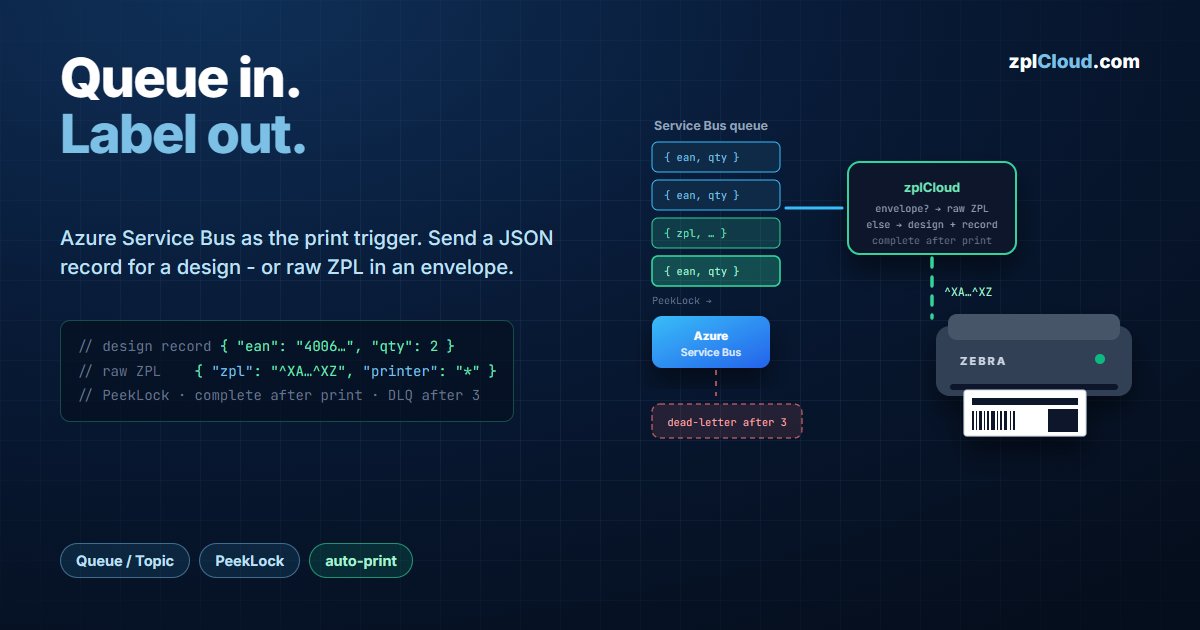
If your systems already talk over Azure Service Bus, the print job is a message like any other. A Data Streaming subscription of type Service Bus consumes a queue or a topic subscription and prints every message - no polling job, no print middleware, no Windows print server between the bus and the printer.
The interesting part is that a message can be either of two things, and zplCloud decides per message:
- A JSON record - the object keys fill the bindings of a label design. Use this when the sender knows the data, not the layout.
- A ZPL envelope - a JSON object carrying finished ZPL. Use this when the sender already produces ZPL and just needs it on a printer.
Both go through the same subscription; you do not configure a mode.
Setting up the subscription
| Field | Value |
|---|---|
| Type | Service Bus |
| Connection config | the namespace connection string |
| Topic | queue name, or topic/Subscriptions/subscriptionName |
| Label design | the design used for JSON records |
| Printer | the default target printer |
The connection string is stored AES-encrypted at rest.
Queue or topic is decided by the Topic field, by convention: if the value contains /Subscriptions/, it is treated as topic/Subscriptions/subscriptionName; otherwise it is a queue name. You can also leave it empty and put EntityPath=printer in the connection string.
Subscriptions are not created automatically. Create the topic subscription once in the portal, Service Bus Explorer or the emulator (topic.1/Subscriptions/subscription.1); zplCloud only consumes it.
Unlike the Kafka integration, Service Bus runs cloud-side only - the consumer lives in the backend and connects outbound. There is no on-prem agent variant, because a Service Bus namespace is reachable from the internet anyway.
Payload A - a JSON record for a design
{ "ean": "4006381333931", "qty": 2, "dest": "Ramp 4" }
Keys are matched to the design's bindings by name. Keys without a binding are ignored, bindings without a key render empty.
If the body is not JSON at all, the whole text is bound as $message - enough for a single-field label.
A render error names the field that caused it rather than handing you an SDK message:
ZPL-Renderfehler bei qty: Wert 'zwei' → ...
That is usually a type or length problem: a numeric field fed a word, or a value longer than the field can hold.
Payload B - raw ZPL in an envelope
When the sender already has ZPL, wrap it:
{
  "schemaVersion": 1,
  "zpl": "^XA^FO50,50^A0N,40,40^FDFrom the bus^FS^XZ",
  "printer": "*"
}
The rules for this being treated as an envelope are deliberately strict:
- the body must be a JSON object,
- it must have a
zplproperty that is a non-empty string, - and it must additionally carry
printer(string) orschemaVersion(number).
The last condition is the important one. A plain data record that happens to contain a field called zpl is not hijacked and sent to the printer raw - it still goes through the design path. If you want the envelope behaviour, say so explicitly with printer or schemaVersion.
In envelope mode the design is not touched at all: the ZPL goes to the printer byte for byte.
Choosing the printer per message
The envelope's printer overrides the subscription's printer for that message. Two sentinels broadcast:
"*"or"all"- every printer in the workspace, Weblink and remote agent printers alike.
Each target counts as its own label against your quota, so a broadcast to eight printers is eight labels. That is the right model for a shift-change notice; it is an expensive mistake for a per-order label.
Delivery semantics: PeekLock, and what happens when a print fails
This is where a queue integration is either trustworthy or not. The receiver runs in PeekLock mode with PrefetchCount = 0 - receiving is not deleting, and no messages are buffered inside the process, so stopping or restarting the subscription never swallows or duplicates a batch.
| Outcome | What happens to the message |
|---|---|
| Printed | Complete - the message leaves the bus |
| Print failed, delivery < 3 | Abandon - redelivered, then a 10 s backoff before the next receive |
| Print failed, delivery ≥ 3 | Dead-lettered with reason Print-Fehler (MaxDeliveryCount erreicht) and the error as description |
Two consequences worth stating plainly:
- A print failure does not stop the consumer. Unlike the Kafka path, the subscription keeps running and retries; only the individual message escalates to the dead-letter queue.
- Success is "the bytes reached the printer socket." A Zebra never acknowledges a ZPL label, so waiting for a confirmation would mean a 20-second stall and a duplicate print.
Completehappens once the send succeeded - the debug column showssent (no response)for exactly this case.
Because failed messages are dead-lettered rather than retried forever, the DLQ becomes your queue of labels that did not come out. That is a list you can act on, which is the entire point.
Idle keepalive
If nothing arrives for 60 seconds, the subscription sends a wake command to the target printer. Link-OS printers drop into a low-power state, and without this the first message after a quiet period pays the wake-up latency. The keepalive runs fire-and-forget so it cannot block the receive loop and cause a pile-up.
What you see while it runs
Each subscription keeps a ring buffer of the last 50 messages with the value preview, the print result, and an end-to-end trace:
bus=12ms design=3ms zpl=18ms print=64ms total=85ms
bus is the time between enqueue and receive - that is the queue's latency, not yours. The debug column additionally records the printer, the ZPL byte count, the HTTP status and the raw response.
Messages that fail are also written to a persistent error log, but only on their first delivery. Without that guard, Service Bus's own retries would file the same bad message three times.
Quotas
Every streamed label counts as a render against the plan of the subscription's owner. Two distinct messages appear when you run out:
Render-Limit erreicht (…/… Labels diesen Monat, Tarif …)- the monthly render budget,Streaming-Kontingent erreicht (…)- the streaming cap specifically.
Starter includes streaming for testing, capped at 100 streamed labels per month. Pro includes 2 streaming endpoints (Kafka or Service Bus); each additional endpoint costs 10 € per month. See the pricing page.
Which payload should you send?
| JSON record | ZPL envelope | |
|---|---|---|
| Sender needs to know | field names | the full label layout |
| Layout changes | edit the design, senders unchanged | every sender must be redeployed |
| Per-message printer | subscription's printer | printer, incl. * broadcast |
| Fonts, barcodes, RFID | handled by the design | your responsibility |
Send records if you can. The design stays editable by the people who own the label, and a layout change does not require a release in the system that publishes the messages. Send envelopes when the ZPL comes out of a system you do not control, or when a message must reach several printers at once.