



Amazon & marketplaces
Amazon FNSKU label: size, barcode and a ready-to-print ZPL template
The FNSKU Fulfillment Network Stock Keeping Unit is the identifier Amazon uses to track your inventory inside its fulfillment centers. Every unit that is n…
The FNSKU (Fulfillment Network Stock Keeping Unit) is the identifier Amazon uses to track your inventory inside its fulfillment centers. Every unit that is not commingled needs an FNSKU label that scans on the first try. This guide covers the exact specification and gives you a ZPL template you can print from a CSV.
Specification
| Rule | Value |
|---|---|
| Label size | 1 × 2 in (25.4 × 50.8 mm); minimum 1 × 1 in |
| Barcode | Code 128 (subset B), with interpretation line |
| FNSKU format | 10 characters, X0 + 8 alphanumerics (e.g. X0012ABCD3); for some categories the ASIN itself |
| Text | product title (may be truncated) and condition (New, Used - Like New, …) |
| 300 dpi recommended, 203 dpi acceptable; black on white, matte stock | |
| Placement | over the manufacturer barcode if that barcode is visible; not over seams, edges or expiration dates |
| Quiet zone | at least 0.25 in left and right of the bars |
ZPL template (2 × 1 in, 203 dpi)
^XA
^PW406^LL203^CI28^MD15
^FO24,16^BY2,3,88^BCN,88,Y,N,N^FD{{fnsku}}^FS
^FO24,138^A0N,22,22^FB360,1,0,L^FD{{title}}^FS
^FO24,168^A0N,20,20^FD{{condition}}^FS
^XZ
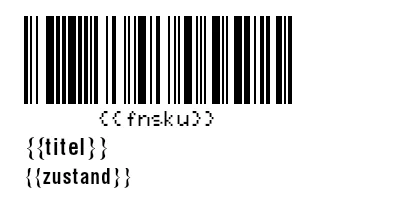
{{fnsku}}, {{title}} and {{condition}} are data bindings: in the zplCloud designer each becomes a field bound to a CSV column, so a batch run of 300 rows prints 300 labels in order. ^BY2 gives a 2-dot module (about 0.25 mm at 203 dpi), which scanners at the fulfillment center read reliably; do not go below ^BY2.
For 300 dpi printers (ZD421 300 dpi, ZT411 300 dpi) use ^PW600^LL300 and multiply the positions and font sizes by 1.5 - or simply switch the label's dpi in the designer, which rescales the ZPL for you.
Getting the FNSKU list
In Seller Central open Inventory → Manage FBA Inventory, select the products and choose Print item labels; the download contains the FNSKU per SKU. For bulk work export the inventory report as a file, keep the columns sku, fnsku, product-name and condition, and use it as the batch data source.
Checks before you print 500
- Scan a test label with a phone barcode app: the decoded value must equal the FNSKU exactly.
- Run the ZPL through the linter with the Amazon FBA profile: it verifies the FNSKU pattern, the Code 128 symbology, the interpretation line, the quiet zone and the 1 × 2 in size.
- Print darkness (
^MD) between 12 and 20 on most Zebra desktop printers; higher values bleed and make bars too wide.
Template: Amazon FNSKU label · Tool: ZPL linter · Overview: Amazon FBA labels