



Amazon & marketplaces
Amazon FBA box label: 4 × 6 in shipment label with box ID barcode
Every carton in an FBA shipment carries a box label generated by Seller Central. The label identifies the shipment, the box number and the destination fulfil…
Every carton in an FBA shipment carries a box label generated by Seller Central. The label identifies the shipment, the box number and the destination fulfillment center; the barcode encodes the unique box ID. Without it, the receiving dock cannot match the carton to your shipment plan and the shipment is delayed or refused.
What is on the label
| Element | Content |
|---|---|
| Ship from | your company name and address |
| Ship to | the Amazon fulfillment center assigned in the shipment plan (e.g. LGB8, LEJ1) |
| Shipment ID | FBA + 9 characters, e.g. FBA15ABCDEF |
| Box ID | shipment ID + U + 6-digit box number, e.g. FBA15ABCDEFU000001 |
| Barcode | Code 128 (Amazon's own labels) or GS1-128 for SSCC-based shipments |
| Box | "Box 1 of 12" |
| Contents | optional: SKU and quantity, "Mixed SKU" |
Size is 4 × 6 in (101.6 × 152.4 mm) at 203 dpi or better. Amazon also accepts the label printed on plain paper from a laser printer, taped to the carton with all edges covered and the barcode uncovered.
ZPL template
^XA
^PW812^LL1218^CI28^MD15
^FO40,40^A0N,30,30^FDSHIP FROM:^FS
^FO40,78^A0N,28,28^FD{{from_name}}^FS
^FO40,110^A0N,28,28^FD{{from_address}}^FS
^FO40,170^GB732,3,3^FS
^FO40,200^A0N,30,30^FDSHIP TO:^FS
^FO40,240^A0N,36,36^FD{{fc_name}}^FS
^FO40,286^A0N,30,30^FD{{fc_address}}^FS
^FO40,340^GB732,3,3^FS
^FO40,370^A0N,30,30^FDShipment: {{shipment_id}}^FS
^FO40,412^A0N,30,30^FDBox {{box_no}} of {{box_count}}^FS
^FO70,500^BY3,3,220^BCN,220,Y,N,N^FD{{box_id}}^FS
^FO40,800^GB732,3,3^FS
^FO40,830^A0N,26,26^FB732,3,0,L^FD{{contents}}^FS
^XZ
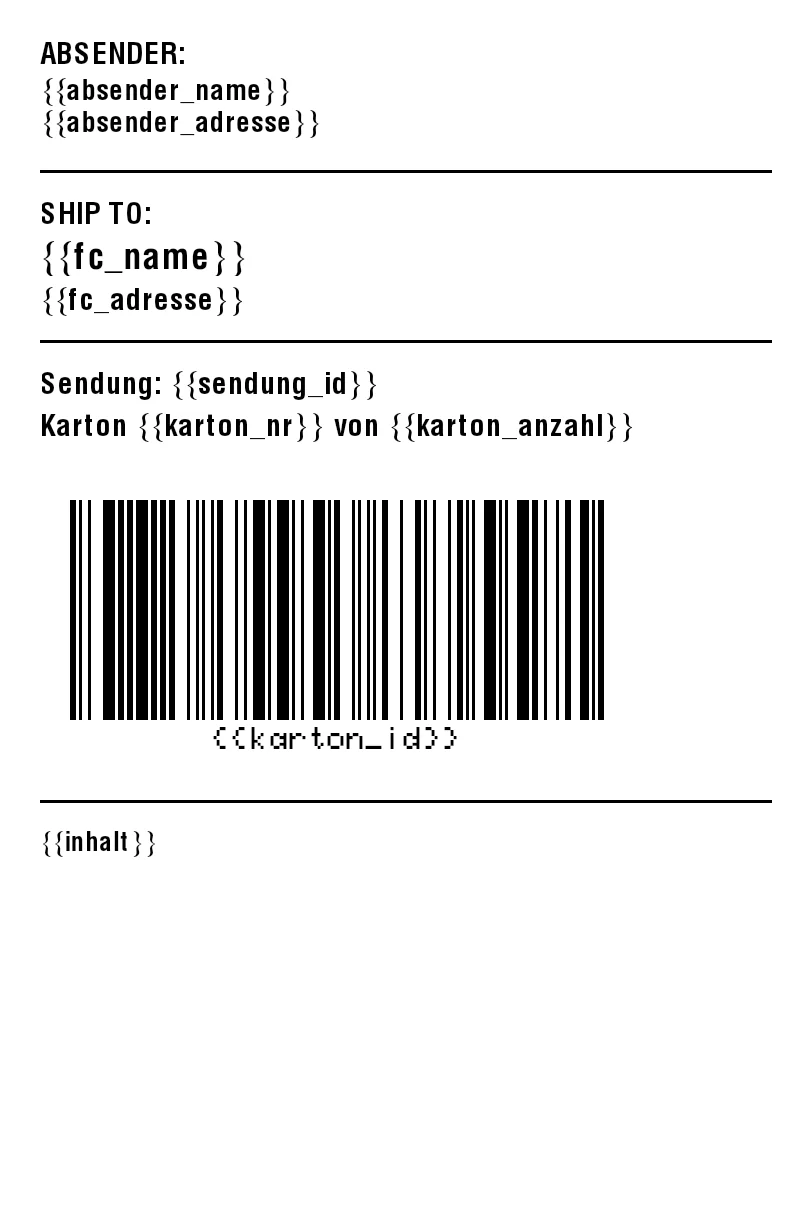
The box ID is 18 characters, so ^BY3 keeps the barcode inside the 4 in width with quiet zones. With 300 dpi (^PW1218^LL1827) use ^BY4.
Printing the labels Amazon gives you
Seller Central offers the box labels as PDF and, for thermal printers, as ZPL. Both work with zplCloud:
- PDF - print as is, or drop it into PDF to ZPL to print it on a Zebra without a driver.
- ZPL - paste it into ZPL to PDF for a laser printer, or import it in the designer (ZPL to design) to overlay your own data: purchase order, pallet number, warehouse bin, SKU list. Amazon's barcode stays untouched.
Box labels from a CSV
For shipments with dozens of cartons, keep one row per carton (shipment_id, box_no, box_count, box_id, contents) and let the batch run print the whole shipment. zplCloud's Shipment batch option generates the rows for "1 of n … n of n" from a single shipment row and computes SSCCs when you ship as a vendor with ASN.
Template: Amazon FBA box label · Tools: ZPL to PDF, PDF to ZPL · Overview: Amazon FBA labels