



zplCloud Blog
Connect a Local SQL Server as a Label Datasource with the zplCloud CLI
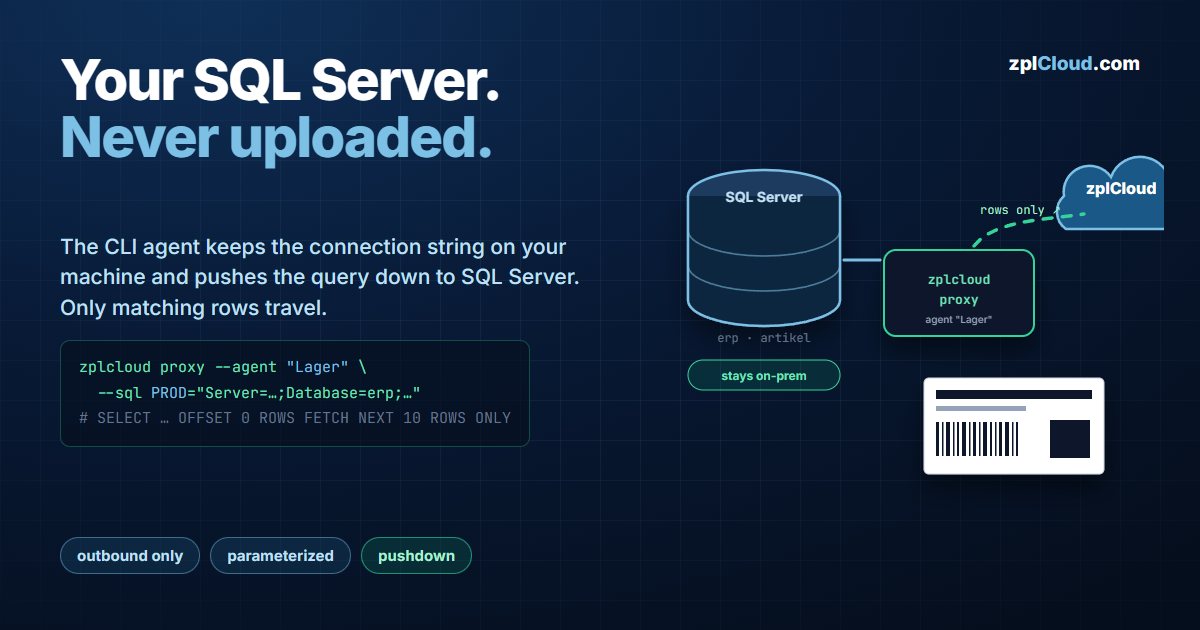
The connection string never leaves your machine. Filters, sorting and paging run as parameterized T-SQL on your server.
The export loop, and why it breaks
Label data lives in an ERP, a WMS or an Azure SQL database. The usual workflow is export to CSV, fix the column names, upload, print - and repeat it tomorrow, because the CSV is already stale.
The zplCloud data hub removes the export. A CLI agent inside your network holds the SQL Server connection string, the platform sends it a query description, and only the result rows come back. The database is never exposed to the internet and the credentials are never stored in the cloud.
This post is the exact mechanics: what runs where, which SQL is generated, and what the hard limits are.
Architecture in one paragraph
zplcloud proxy opens one outbound TLS connection to api.zplcloud.com (SignalR). No inbound port, no NAT rule, no VPN. When you open a datasource in the platform, the backend sends the agent a request object - base query, filter, sort, offset, limit - and the agent turns that into T-SQL, executes it against your SQL Server with your database user, and returns the rows. The connection string exists only in the agent's process memory and its local configuration.
Step 1 - start the agent with one or more servers
# Multiple --sql flags are allowed; the NAME is what you pick in the platform.
zplcloud proxy --agent "Lager" \
  --sql PROD="Server=127.0.0.1;Database=erp;User Id=zplcloud;Password=…;Encrypt=True;TrustServerCertificate=True" \
  --sql WAREHOUSE="Server=sql-wh.internal.lan,1433;Database=logistik;User Id=zplcloud;Password=…;Encrypt=True;TrustServerCertificate=True"
Equivalent without putting secrets in the command line (they would land in your shell history):
# Windows PowerShell - one variable per server, name in the middle
$env:ZPLCLOUD_SQL_PROD_CONNECTION = "Server=127.0.0.1;Database=erp;User Id=zplcloud;Password=…;Encrypt=True;TrustServerCertificate=True"
zplcloud proxy --agent "Lager"
The startup banner lists what it found: SQL servers: PROD, WAREHOUSE. Authentication against the platform uses --api-key <key> or ZPLCLOUD_API_KEY.
Persist it for unattended operation:
- Windows:
setx ZPLCLOUD_SQL_PROD_CONNECTION "…", orzplcloud proxy --agent "Lager" --service-install --api-key sk_zplcloud_… - Linux/Raspberry Pi: same
--service-installflag; it writes a systemd unitzplcloud-agent.servicewithRestart=always - File instead of env:
sqlservers.jsonnext to the binary or in~/.zplcloud/, shape{ "sqlServers": { "PROD": "Server=…" } } - Docker:
ZPLCLOUD_SQL_PROD_CONNECTIONindocker-compose.agent.yml
Connection string notes that cost people an hour
Encrypt=True;TrustServerCertificate=Trueis the pragmatic pair for an internal server with a self-signed certificate. DropTrustServerCertificateonce you have a real cert.- A named instance needs
Server=host\\INSTANCE; a non-default port isServer=host,1433- comma, not colon. - Use a dedicated SQL login with
SELECTon exactly the tables the labels need. The agent runs everything as that user, so the database is the permission boundary - not the platform.
Step 2 - create the datasource
In Data sources the running agent shows up under Remote SQL Server with one chip per configured name. Clicking a chip pre-fills the form.
| Field | Value |
|---|---|
| Name | Lager-Artikel |
| Type | SQL Server |
| Server | PROD (the name from --sql PROD=…) |
| Query | SELECT ean, name, price FROM artikel |
Test runs SELECT 1 and returns server · database. Fields reads the column metadata via SELECT TOP 1 * with CommandBehavior.SchemaOnly - it fetches the schema without pulling data. If a heavily nested query returns no schema, the agent retries once with SingleRow.
Step 3 - what the agent actually executes
Your base query is wrapped as a subquery. Filter, sort and paging are appended by the agent:
SELECT * FROM ( SELECT ean, name, price FROM artikel ) AS ds
WHERE ean LIKE @p0
ORDER BY name
OFFSET 0 ROWS FETCH NEXT 10 ROWS ONLY
Three things are worth reading twice:
1. Values are parameters, never string concatenation. The filter builder emits @p0, @p1, … and binds the values through SqlCommand.Parameters. There is no place where a user-entered value becomes SQL text.
2. Paging is native. limit 10 becomes FETCH NEXT 10 ROWS ONLY; SQL Server does the work and returns ten rows over the wire, not a million.
3. The row count is a separate query. When you ask for the total, the agent runs SELECT COUNT(*) FROM (<base>) AS ds with the same WHERE and the same parameters.
The hard limits (from the agent source)
| Limit | Value | Where it applies |
|---|---|---|
| Rows per request | 1000 (RowCap) | limit is clamped to 1…1000; default when unset is 100 |
| Command timeout | 15 s | test, describe, query and count |
| Statement type | SELECT only | base query is validated; multi-statements are rejected |
| Sort / filter columns | validated identifiers | not passed through as free-form SQL |
If you need more than 1000 rows in one view - batch printing, a full catalog - the platform pages through the result set with increasing OFFSET. Each page is its own 1000-row request against your server, so memory stays flat regardless of the total.
A 15-second timeout is deliberate. If your base query cannot answer in 15 seconds it belongs in an indexed view or a table with the right index, not in a label datasource.
Step 4 - use it in the designer and in Print Views
- Designer → Test Data tab → Data source: pick the datasource and press Load. Field bindings render with real rows instead of placeholder text, so you see the actual field lengths before anything reaches a printer.
- Print Views → configuration → Data source (data hub): the view's preview and its printing use the live query. The operator sees current data; nobody re-uploads a CSV.
Failure modes and what they mean
| Symptom | Cause |
|---|---|
| Agent starts but no chip appears | --sql name missing, or the agent authenticated with a key from a different workspace |
Test fails instantly | connection string wrong (instance, port, credentials) - the error is passed through from SQL Server |
Test hangs, then fails | 15 s timeout: server unreachable from the agent machine, or a firewall drops the packet silently |
Fields returns nothing | the base query is too nested for SchemaOnly; the agent falls back to SingleRow, which needs at least one row to exist |
| Query works, Print View is empty | the view is bound to a different datasource, or the filter excludes all rows |
Plan
The data hub (SQL Server and MongoDB datasources via the CLI agent) is part of the Pro plan. Details on the pricing page.