



zplCloud Blog
Kafka Topics Straight to the Printer: Data Streaming as a Print Trigger
One subscription = topic + design + printer. What the consumer does on a failed print is the part worth reading.
The stream is already there
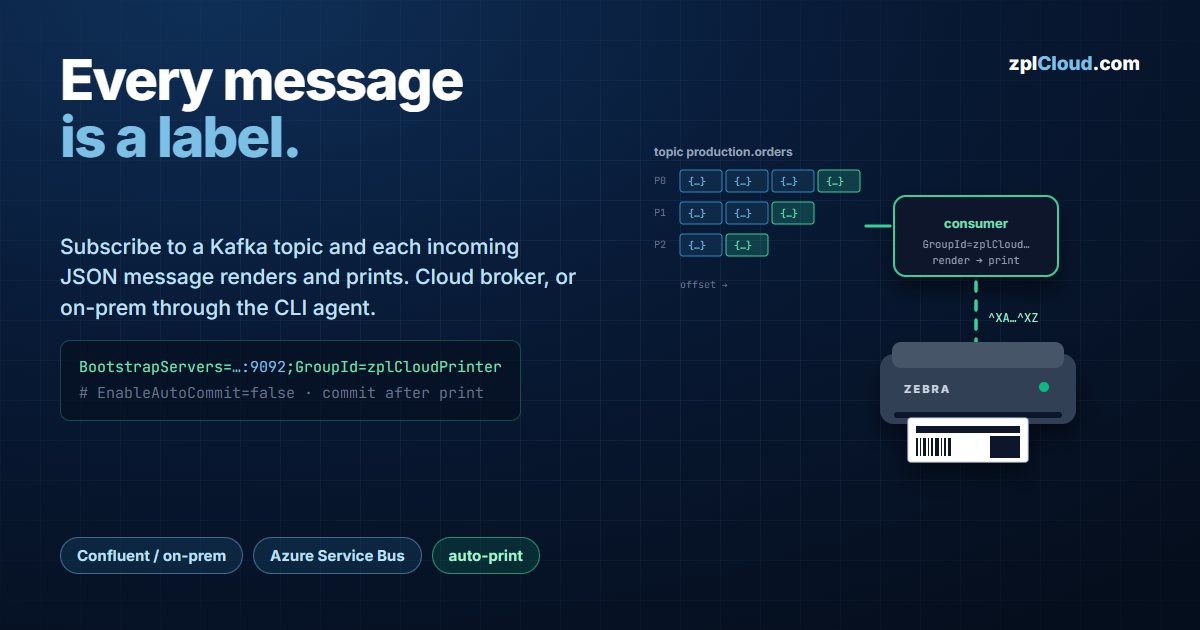
Your ERP or MES already publishes order events, picking messages and serial numbers to Kafka. Usually that stream ends on a screen and a human presses print.
The Data Streaming tab makes the stream the trigger: subscribe to a topic, and every message is rendered with a label design and sent to a printer. No middleware, no polling job, no print server.
Two deployments:
- Cloud - the platform consumes the topic itself (Confluent Cloud, MSK, any broker reachable over the internet).
- On-prem - a broker inside your network, consumed by the zplCloud CLI agent. Broker credentials never leave your network.
What a subscription binds
Four things: a topic, a label design, a printer, and - in cloud mode - the broker connection config. For every message the platform:
1. parses the value as JSON and uses the object keys as field bindings,
2. renders the design with the same engine the designer uses,
3. sends the resulting ZPL to the printer (Weblink, or a remote printer on a CLI agent via TCP 9100 / USB).
If the value is not JSON, the whole text is bound to $message - enough for a single-field label.
Connection config
The config is a key=value; string, stored AES-encrypted at rest:
BootstrapServers=pkc-xxxxx.eu-central-1.aws.confluent.cloud:9092;
GroupId=zplCloudPrinter;
SecurityProtocol=SaslSsl;SaslMechanism=Plain;
SaslUsername=<api-key>;SaslPassword=<api-secret>
Defaults applied when you do not set them:
| Setting | Default | Why it matters |
|---|---|---|
AutoOffsetReset | Latest | a new subscription starts at the head - it does not print the entire topic history on first start |
EnableAutoCommit | false | offsets are committed by the platform, after a successful print - not on a timer |
AutoCommitIntervalMs | 0 | irrelevant while auto-commit is off |
AutoOffsetReset=Earliest is the deliberate opt-in for replaying a topic. Set it only when you mean it: on a topic with history, the first start prints all of it.
SCRAM (SaslMechanism=ScramSha256 / ScramSha512) and a custom CA (SslCaLocation=…) are supported. Unknown keys are passed through to the consumer config as-is.
For an on-prem broker, register it on the agent instead:
zplcloud proxy --agent "Lager" \
  --kafka LOKAL="BootstrapServers=10.0.0.10:9092;GroupId=zplCloudConsumer"
The agent reports Kafka brokers: LOKAL. When a subscription needs it, the platform asks the agent to run the consumer - the broker stays unreachable from the internet.
The delivery semantics, precisely
This is the part most streaming integrations get vague about, so here it is exactly as implemented:
- The consumer polls with a 30-second timeout.
- On a message: render, print, then
Commit(msg)only if the print succeeded. - If the print fails, the offset is not committed and the consumer stops. The subscription flips to disconnected and shows
Print failed: <error>. It does not skip the message and it does not spin in a retry loop. - Because the default is
AutoOffsetReset=Latest, restarting after a failure does not automatically redeliver the failed message. If you want the failed message retried on restart, putAutoOffsetReset=Earliestin the config - then the uncommitted offset is picked up again.
The reasoning: a label that did not print is an operational fact someone has to see. Silently advancing past it would lose a physical label; retrying forever would stall the partition. Stopping makes it visible and leaves the offset where it is.
ConsumeException - broker unreachable, auth rejected, topic gone - is treated differently. That is not a print failure, so the consumer retries with an exponential backoff starting at 5 s and capping at 60 s, and the last broker error is shown on the subscription.
Idle keepalive
If no message arrives for 60 seconds, the platform sends a wake command to the target printer. Link-OS printers drop into a low-power state; without the keepalive the first message after a quiet period pays the wake-up latency before it prints. The keepalive touches the printer, not the topic - no offset is consumed or committed.
Creating the subscription
| Field | Value |
|---|---|
| Name | Production labels |
| Type | Cloud (Internet) or On-Prem (via zplCloudCli) |
| Connection config | cloud only: BootstrapServers=…;… |
| Agent + broker | on-prem only: pick the agent and the broker chip |
| Topic | production.orders |
| Label design | the design whose bindings match the message keys |
| Printer | Weblink printer or remote printer on a CLI agent |
Press Start. The subscription then shows live status - connected, last message time, last offset, message count - and a log with the recent message values and their print result.
Message shape
{ "ean": "40063812", "qty": 2, "dest": "Ramp 4" }
Keys map to bindings by name. Keys that no binding uses are ignored; bindings without a matching key render empty. Design the label against a real message before you go live - Test Data in the designer accepts pasted JSON.
Restart behaviour
Active subscriptions restart when the platform restarts, and on-prem subscriptions restart when the CLI agent reconnects. A nightly maintenance window or a dropped connection does not require anyone to press Start again - with the exception above: a subscription stopped by a print failure stays stopped until you fix the printer and start it.
Plans
Data streaming is metered. Starter includes it for testing, capped at 100 streamed labels per month. Pro includes 2 streaming endpoints (Kafka / Azure Service Bus); each additional endpoint is 10 € per month. See the pricing page.