



zplCloud Blog
GS1 QR Code and the Digital Product Passport: one code for the checkout and the customer
From 2027 the EU requires a Digital Product Passport for the first product groups. The way there is not a second code next to the barcode - it is a GS1 Digital Link, and you do not even need your own domain for it.
Two codes on one label is a workaround
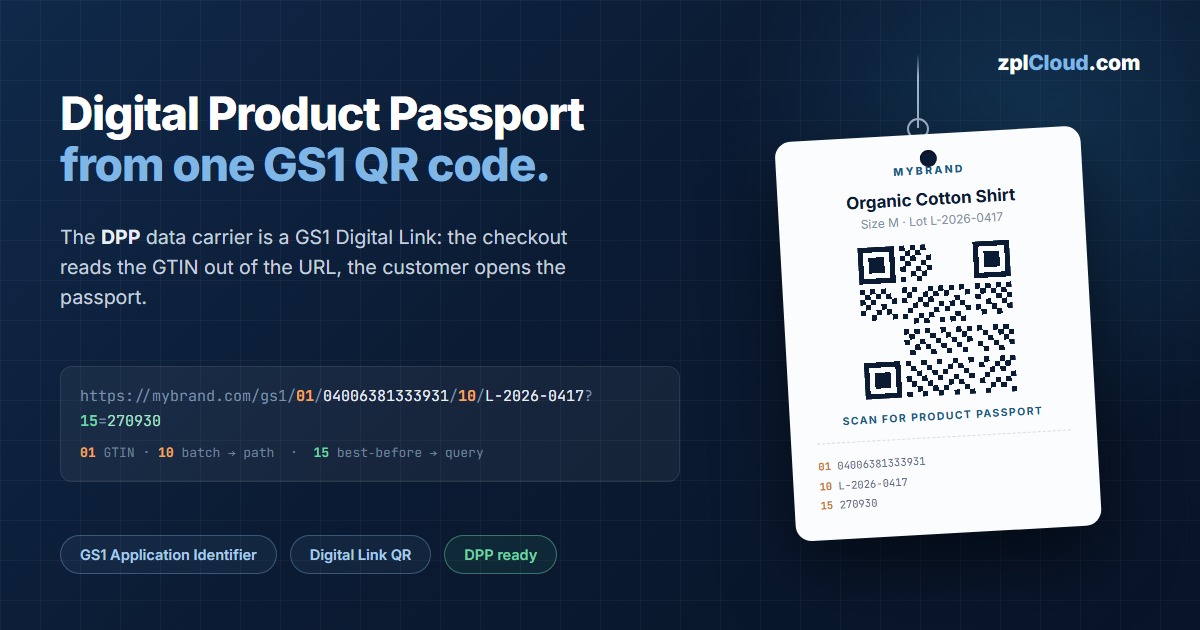
Anyone linking to a product passport today usually sticks a second QR code next to the EAN barcode. It costs space, confuses the checkout, and nobody knows which code is the right one.
The GS1 Digital Link - often simply called a Digital Link QR - solves this differently: it encodes the product data as an ordinary URL. A checkout scanner recognises from the path pattern that a GTIN is inside and extracts it. A phone opens the same address as a web page. One code, two audiences.
https://mybrand.com/gs1/01/04006381333931/10/L-2026-0417/21/SN-0000184?15=270930
                        └──┬─┘└──────┬─────┘└┬┘└────┬────┘└┬┘└───┬───┘  └┬┘└──┬─┘
                        GTIN key   GTIN     batch  batch  serial serial exp. date
                                            key            key          key
Each pair in that URL is a GS1 Application Identifier (AI) and its value - the full list is in the GS1 AI reference. Primary keys and their qualifiers form the path; every further attribute is appended as a query string. Exactly this split makes the URL unambiguous for scanners.
The mistake about needing your own domain
Almost every guide starts with: "Set up a resolver at id.yourbrand.com." That is where most projects stall - new hostname, new certificate, DNS request, operational ownership.
None of it is necessary. GS1 allows arbitrary path segments before the application identifiers. Your existing company domain plus a subpath is enough:
https://mybrand.com/gs1/01/04006381333931
A single redirect rule on the web server you already run does the job. GS1 confirms this explicitly in its knowledge base: Is it OK to include additional path segments?
A useful side effect: while the passport does not exist yet, /gs1/… simply points at the product page. Printed labels stay valid when the real passport later moves to the same address.
What the Digital Product Passport asks for
The DPP comes from the EU Ecodesign Regulation (ESPR) and is introduced product group by product group. Textiles are in the first wave; batteries, electronics and furniture follow. Required are details on origin, material composition, repairability and recycling - digitally retrievable through a data carrier on the product.
For the labelling side that means three things:
1. The carrier is a 2D code. In practice a GS1 QR Code or GS1 DataMatrix.
2. It has to be item-level. A GTIN alone is not enough when batch or serial belong to traceability.
3. It has to resolve permanently. The URL outlives the product - hence your own domain and no short-link service.
Worth reading:
The trap that breaks GS1 codes in practice
A GS1 code is not a symbology of its own - it is an agreement about the content, expressed as GS1 Application Identifiers (AI): two- to four-digit prefixes that say what the value behind them means - 01 GTIN, 10 batch, 21 serial, 15 best-before. The same data sits in GS1-128, GS1 DataMatrix, GS1 QR and GS1 DataBar, only packed differently. And the packing is where almost everyone slips.
Application identifiers have either a predefined or a variable length. An element of variable length must be followed by a separator (FNC1) - but not when it is the last one. Separating after every variable field produces a code that some scanners read and others do not.
01 04006381333931  10 L-2026-0417 <GS>  21 SN-0000184
│                  │                    │
predefined length: variable:            variable, but last
no separator       separator needed     element: NO separator
Then there are the silent errors: a GTIN with a wrong check digit, month 15 in a date field, characters outside GS1 character set 82. None of it is visible on a printed code - until the goods sit stuck in goods-in.
In the designer
zplCloud now has a GS1 section on every barcode element. Instead of assembling a content string you maintain a list of application identifiers:
- Pick the GS1 Application Identifier (AI) - with plain-language name, length rule and character set
- Enter the value - fixed, or bound to a field of your data source
- Choose the encoding - bracket notation for GS1-128 and DataBar, FNC1 raw form for GS1 DataMatrix, Digital Link for GS1 QR
- Validation as you type - length, character set, date plausibility and check digit
The editor places the separators itself, following the rule above including the exception for the last element. The resulting content appears below the list, with control characters shown as <GS>.
Also newly selectable: GS1 DataBar Expanded - the compact variant for fresh food and small labels where a GS1-128 does not fit.
A template to start from
The template gallery contains GS1 QR Code with Digital Product Passport (DPP): 50 × 30 mm, a GS1 QR Code carrying a Digital Link built from GTIN, batch, serial and best-before date, with the same details in plain text next to it. Open it, enter your resolver domain, bind the values to your data source.
What you can do today
The DPP feels far away, but the groundwork is small and it lasts:
1. Decide on the subpath. /gs1 on the company domain, redirecting to the product page. One line of web server configuration.
2. Print the GS1 QR alongside. Next to the EAN, while checkouts have not switched over.
3. Include batch and serial. They cost almost nothing inside the code and are the basis of any later traceability.
When the obligation kicks in, only the content behind the URL still has to be built - the labels are already right.
Ready to use
The label described here exists as a template, and every identifier that can go into the code
is listed with its data type, length and meaning:
- DPP label template with GS1 Digital Link QR
- GS1 Application Identifier database - all 224 identifiers, searchable
- Check a barcode - paste the code or upload a photo