



Inventory
Warehouse location
Bin location label with aisle, rack, level, position, a large readable code and matching barcode – for fast put-away and picking.
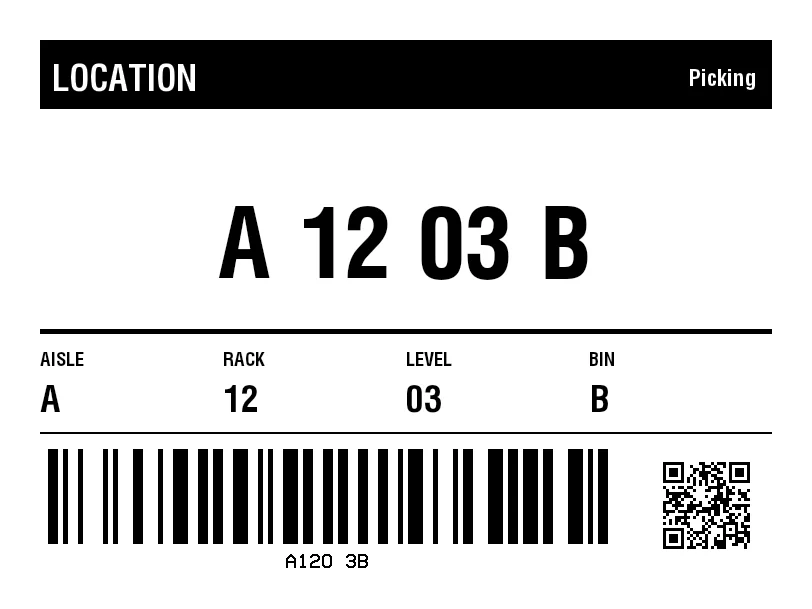
Rendered from this template's ZPL - exactly how the label leaves the printer. Click to enlarge.
ZPL code
^XA
^MD15
^PR5
^LL609
^PON
^PQ1,0,0,N
^MUd
^PW812
^MNY
^LH0,0
^PMN
^CI28
^BY,2,2,0
^FO40,40
^GB732,69,69,B
^FS
^FO52,56
^GB425,51,51,B
^FS
^FR
^FWN
^FO52,64
^A0,36
^FB425,1,8,L,
^FDLOCATION
^FS
^FO477,63
^GB283,44,44,B
^FS
^FR
^FWN
^FO477,69
^A0,23
^FB283,1,6,R,
^FDPicking
^FS
^FO48,449
^BY5
^BCN,95,N,N,N,N
^FD>:A120 3B
^FS
^CI13
^FWN
^FO286,552
^AD,,9
^FDA120 3B
^FS
^FO663,460
^BQN,2,3,M
^FDA,https://zplcloud.com/a/AST-2026-00142
^FS
^FO40,432
^GB732,2,2,B
^FS
^FWN
^FO40,352
^A0,19
^FB167,1,4,L,
^FDAISLE
^FS
^FWN
^FO40,385
^A0,37
^FB167,1,11,L,
^FDA
^FS
^FWN
^FO223,352
^A0,19
^FB167,1,4,L,
^FDRACK
^FS
^FWN
^FO223,385
^A0,37
^FB167,1,11,L,
^FD12
^FS
^FWN
^FO406,352
^A0,19
^FB167,1,4,L,
^FDLEVEL
^FS
^FWN
^FO406,385
^A0,37
^FB167,1,11,L,
^FD03
^FS
^FWN
^FO589,352
^A0,19
^FB167,1,4,L,
^FDBIN
^FS
^FWN
^FO589,385
^A0,37
^FB167,1,11,L,
^FDB
^FS
^FO40,329
^GB732,5,5,B
^FS
^FWN
^FO40,206
^A0,96
^FB732,1,25,C,
^FDA 12 03 B
^FS
^XZ
Bin location label with aisle, rack, level, position, a large readable code and matching barcode – for fast put-away and picking.
What is this label for?
Location labels are the address book of a warehouse. A large, readable code lets staff find a location at a glance, while the barcode lets the scanner confirm the exact location during putaway, picking and replenishment.
What this template contains
- Location code (aisle-rack-level-bin)
- Large, readable text
- Location barcode (Code 128)
- Zone or area reference
When to use it
- Rack and bin locations
- Picking and bulk locations
- Cross-docking and staging zones
- Cold stores and yards
How to edit it in the editor
Open it in the visual editor, change text, sizes, fonts and barcodes by clicking on each element and export to ZPL, PNG or PDF.
FAQ
How do I structure the location code?
A common scheme is aisle-rack-level-bin (e.g. A-12-03-B). Edit text and barcode in the editor to match your numbering.
What should be bigger, text or barcode?
Both matter: keep the text large for manual picking and the barcode suitable for your scanners. This template balances both.
Can I colour-code zones?
Thermal printing is single-colour, but you can use bold zone letters or frames, or print on coloured label material.