



Inventory
Asset tag
Asset label for inventory number, description and barcode – for IT and asset tracking, printable at 203/300/600 dpi.
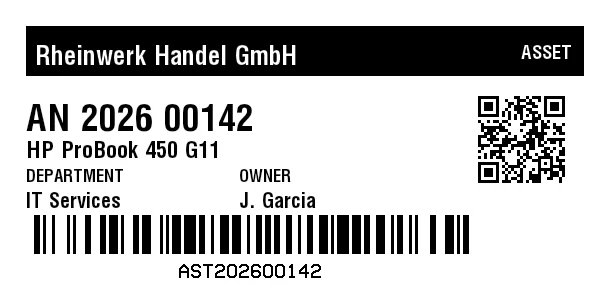
Rendered from this template's ZPL - exactly how the label leaves the printer. Click to enlarge.
ZPL code
^XA
^MD15
^PR5
^LL305
^PON
^PQ1,0,0,N
^MUd
^PW609
^MNY
^LH0,0
^PMN
^CI28
^BY,2,2,0
^FO26,26
^GB558,50,50,B
^FS
^FO35,37
^GB324,36,36,B
^FS
^FR
^FWN
^FO35,45
^A0,26
^FB324,1,8,L,
^FDRheinwerk Handel GmbH
^FS
^FO358,41
^GB216,32,32,B
^FS
^FR
^FWN
^FO358,45
^A0,19
^FB216,1,4,R,
^FDASSET
^FS
^FO34,215
^BY3
^BCN,39,N,N,N,N
^FD>:AST>520260014>62
^FS
^CI13
^FWN
^FO179,262
^AD,,9
^FDAST202600142
^FS
^FO478,94
^BQN,2,3,M
^FDA,https://zplcloud.com/a/AST-2026-00142
^FS
^FWN
^FO26,104
^A0,37
^FB426,1,11,L,
^FDAN 2026 00142
^FS
^FWN
^FO26,141
^A0,23
^FB426,1,6,L,
^FDHP ProBook 450 G11
^FS
^FWN
^FO26,169
^A0,17
^FB213,1,4,L,
^FDDEPARTMENT
^FS
^FWN
^FO26,192
^A0,21
^FB213,1,4,L,
^FDIT Services
^FS
^FWN
^FO239,169
^A0,17
^FB213,1,4,L,
^FDOWNER
^FS
^FWN
^FO239,192
^A0,21
^FB213,1,4,L,
^FDJ. Garcia
^FS
^XZ
Asset label for inventory number, description and barcode – for IT and asset tracking, printable at 203/300/600 dpi.
What is this label for?
Asset labels show who has what and where it is. Scanning the inventory number during stocktakes, maintenance and handovers keeps your asset register correct and makes audits effortless.
What this template contains
- Inventory / tag number
- Device description
- Owner / department
- Asset barcode (Code 128) and QR code
When to use it
- IT equipment (laptops, monitors, phones)
- Asset and equipment registers
- Tools, machines and instruments
- Audits, maintenance and handovers
How to edit it in the editor
Open it in the visual editor, change text, sizes, fonts and barcodes by clicking on each element and export to ZPL, PNG or PDF.
FAQ
Barcode or QR for assets?
This template has both: Code 128 for the short inventory number and the QR code for the link to the record. If you only need one code, remove the other in the editor.
Does it stick to the device?
The ZPL prints on the loaded label material - use durable or polyester labels for heavily used assets.
Can I print sequential inventory numbers?
Yes. Use the counter element in the editor to number a series automatically.