



Price
Price label
Price label with a large, unmissable price next to the product name – readable at arm's length, for shelf edges and counters.
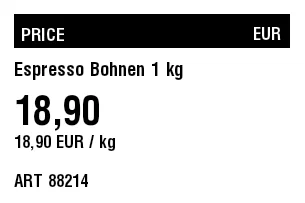
Rendered from this template's ZPL - exactly how the label leaves the printer. Click to enlarge.
ZPL code
^XA
^MD15
^PR5
^LL203
^PON
^PQ1,0,0,N
^MUd
^PW305
^MNY
^LH0,0
^PMN
^CI28
^BY,2,2,0
^FO14,14
^GB276,34,34,B
^FS
^FO21,22
^GB160,24,24,B
^FS
^FR
^FWN
^FO21,28
^A0,18
^FB160,1,6,L,
^FDPRICE
^FS
^FO181,23
^GB103,24,24,B
^FS
^FR
^FWN
^FO181,27
^A0,17
^FB103,1,4,R,
^FDEUR
^FS
^FWN
^FO14,174
^A0,17
^FB276,1,4,L,
^FDART 88214
^FS
^FWN
^FO14,62
^A0,19
^FB276,1,4,L,
^FDEspresso Bohnen 1 kg
^FS
^FWN
^FO14,95
^A0,39
^FB276,1,11,L,
^FD18,90
^FS
^FWN
^FO14,135
^A0,17
^FB276,1,4,L,
^FD18,90 EUR / kg
^FS
^XZ
Price label with a large, unmissable price next to the product name – readable at arm's length, for shelf edges and counters.
What is this label for?
Price labels communicate the price immediately and consistently throughout the store. A striking price, a clear product name and an optional unit price help with decisions and keep the shelf tidy and trustworthy.
What this template contains
- Large, eye-catching price
- Product name
- Unit price or measure (optional)
- Currency and article number
When to use it
- Price marking at the shelf edge
- Special offers and discounts
- Markets, bakeries and delicatessens
- Counters and POS displays
How to edit it in the editor
Open it in the visual editor, change text, sizes, fonts and barcodes by clicking on each element and export to ZPL, PNG or PDF.
FAQ
How do I make the price even bigger?
Click the price text in the editor and enlarge it or drag its frame larger; the rest of the layout stays intact.
Can I show a sale price 'before / after'?
Yes - duplicate the price element, set one smaller with a strikethrough style and the other as the sale price.
Does it need a barcode?
Not necessarily; a price label puts the price in the foreground. If you also need to scan, use the product label template instead.