

Connectors
Overview
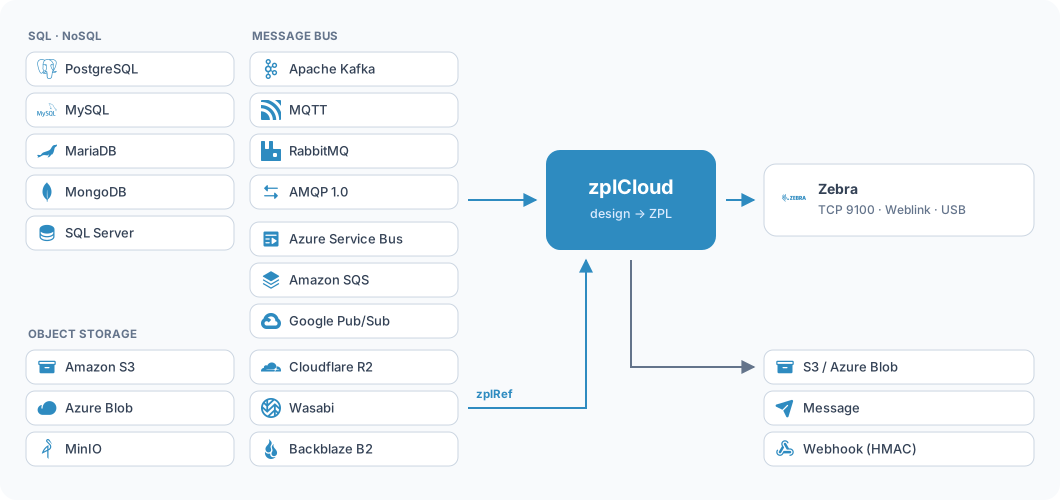
A label needs two ingredients: data and a design. The data either comes on demand from a database or arrives on its own through a message bus. Finished ZPL may also sit inside the message or live in object storage. After the print, zplCloud can store the result and say so.
Data sources (data hub)
A data source is a stored query against one of your databases, and there are two routes to it. On the agent route the zplCloudCli agent runs the query inside your network; the connection string lives only there and never leaves - only the result rows travel over the wire. On the cloud route the backend connects by itself, for example to an Azure Database for PostgreSQL or Amazon RDS; the connection string is then stored AES-encrypted in the platform database and decrypted only to run the query.
| Type | Engine | Route |
|---|---|---|
agent-sql | Microsoft SQL Server | Agent |
agent-mongo | MongoDB | Agent |
agent-postgres | PostgreSQL | Agent |
agent-mysql | MySQL | Agent |
agent-mariadb | MariaDB | Agent |
cloud-postgres | PostgreSQL | Backend direct |
cloud-mysql | MySQL | Backend direct |
cloud-mariadb | MariaDB | Backend direct |
The data hub is a Pro feature. It is used by print views, DHL lookups and batch printing.
Configuring databases on the agent
The agent learns about its databases in three ways: as a command line option, as an environment
variable, or from a file next to the binary or under ~/.zplcloud/. Each engine has its own
namespace so the choice in the UI stays unambiguous.
| Engine | Option | Environment variable | File |
|---|---|---|---|
| SQL Server | --sql NAME=… | ZPLCLOUD_SQL_<NAME>_CONNECTION | sqlservers.json |
| MongoDB | --mongo NAME=… | ZPLCLOUD_MONGO_<NAME>_CONNECTION | mongoservers.json |
| PostgreSQL | --postgres NAME=… | ZPLCLOUD_PG_<NAME>_CONNECTION | pgservers.json |
| MySQL | --mysql NAME=… | ZPLCLOUD_MYSQL_<NAME>_CONNECTION | mysqlservers.json |
| MariaDB | --mariadb NAME=… | ZPLCLOUD_MARIADB_<NAME>_CONNECTION | mariadbservers.json |
What a query may contain
The same rules apply to every relational source, agent or cloud. They are deliberately tight: a data source is there to read, not to write.
- A single
SELECT(orWITH) only - no;, no comments, no multi-statements. - Filter values always reach the database as parameters (
@p0), never through string concatenation. - Filter, sort and
LIMIT/OFFSETare applied in the source (pushdown), not in the platform's memory. - At most 1000 rows per fetch, 15 second timeout. Larger sets are fetched server-side in chunks.
Message buses
A subscription connects a bus to a printer. Every incoming message becomes a record, fills the bindings of a design and prints - or carries finished ZPL as an envelope. Kafka runs either straight from the cloud or on-prem through the agent; every other bus runs straight from the cloud.
| Type | Connection string | Topic field |
|---|---|---|
cloud (Kafka) | BootstrapServers=broker:9092;GroupId=zplCloudConsumer | topic |
agent (Kafka on-prem) | lives on the agent (--kafka NAME=…) | topic |
servicebus | Endpoint=sb://…;SharedAccessKeyName=…;SharedAccessKey=… | queue or topic/Subscriptions/name; optional when the string carries EntityPath |
mqtt | Server=broker;Port=8883;Tls=true;Username=…;Password=…;Qos=1 | topic filter (+ and # allowed) |
amqp10 | amqps://user:password@broker:5671 | address (queue or node) |
rabbitmq | amqp://user:password@rabbit:5672/vhost | queue name (not created automatically) |
sqs | QueueUrl=…;Region=eu-central-1;AccessKey=…;SecretKey=… | queue URL; optional when QueueUrl is in the string |
pubsub | ProjectId=…;SubscriptionId=…;CredentialsBase64=… | subscription id; optional when SubscriptionId is in the string |
For Amazon SQS, leaving out AccessKey/SecretKey falls back to the normal AWS
credential chain (IAM role, environment, profile). For Google Pub/Sub the service account JSON is passed
Base64 encoded, because the JSON itself contains semicolons and line breaks that would
otherwise split the key=value pairs.
Acknowledgement: nothing is lost silently
Every bus follows the same rule: nothing is acknowledged before the print. As long as the ZPL has not reached the printer, the message counts as open and is delivered again.
| Bus | On success | On print failure |
|---|---|---|
| Kafka | commit the offset | offset stays put, the message comes back |
| Azure Service Bus | complete (PeekLock) | abandon with backoff, dead-letter after 3 deliveries |
| MQTT | ack | no ack - the broker redelivers at QoS 1/2 |
| AMQP 1.0 | accept | release, the broker redelivers |
| RabbitMQ | BasicAck | BasicNack with requeue |
| Amazon SQS | DeleteMessage | not deleted, redelivered after the visibility timeout (then redrive/DLQ) |
| Google Pub/Sub | ack | nack, Pub/Sub redelivers per its retry policy |
ZPL envelope and ZPL from object storage
A subscription without a design expects finished ZPL in the message. The printer field
names the target serial, rp:{id} for a remote printer, or "*" for every
printer on the account.
Large print files do not belong inside a bus message. Instead of embedding the ZPL, the message points
at it: storage is the name of a storage connection, key the object key inside
it. The file is only fetched at print time. The name resolves within your own or your company's scope
only - someone else's connection cannot be reached this way.
Storage connections (S3 and Azure Blob)
A storage connection is created once and used in both directions: for reading through
zplRef and for writing through an output target. The credentials are stored AES-encrypted
in the platform database; the UI only shows whether credentials exist, never their value.
| Provider | Bucket / container | Credentials | Notes |
|---|---|---|---|
s3 | bucket | AccessKey=…;SecretKey=… (optional SessionToken) | Without credentials the AWS credential chain applies. Custom Endpoint plus path style for MinIO, R2, Wasabi, Backblaze and Ceph. |
azureblob | container | connection string or container SAS URL | With a SAS URL the link already points at the container. |
Output targets: store it and say so
An output target bundles up to three steps that run after a successful print. Each one is switched on separately, and all of them run after the print: a failure there never stops the print, it only lands in the subscription log.
- Store - the printed ZPL is written as a file into a storage connection.
- Notify - a message goes to a broker; the same protocols as on the receiving side are supported.
- Trigger - an HTTP POST to your own URL, HMAC-SHA256 signed like every other webhook.
The file name
The key is built from a template. All times are UTC, placeholders without a value are dropped.
| Placeholder | Meaning |
|---|---|
{yyyy} {MM} {dd} | year, month, day |
{HH} {mm} {ss} | hour, minute, second |
{subscription} | name of the subscription |
{printer} | target printer |
{key} | key of the bus message |
{id} | unique id per label |
What the notification carries
The message and the webhook receive the same payload. The ZPL itself is only included when you ask for it - otherwise a graphics-heavy file blows past every message size limit.
The webhook carries the same headers as the regular webhook endpoints:
X-ZplCloud-Event, X-ZplCloud-Delivery, X-ZplCloud-Timestamp and,
once a secret is stored, X-ZplCloud-Signature with the HMAC-SHA256 over the raw body.
Trying it without hardware
You do not need a real printer to test any of this: a virtual test printer accepts ZPL like a device and drops the rendered label into its own history - no render quota, watermarked output. It sits in the "Sandbox printers" tab under Printers and is selectable in every "send ZPL" dialog, so a whole subscription including its output target can be rehearsed before any paper moves.